TN Secretary of State Business Entity Search Guide

A vendor record lands in your onboarding queue with a familiar Tennessee business name. The search returns a match marked active, and your system is ready to approve it. Before it does, someone needs to check whether the record belongs to the right entity, what its status means, and whether the supporting filings are current.
The TN Secretary of State business entity search is most useful when treated as an evidence pipeline, not a yes-or-no verification button. Each field answers a different question, and some decisions require dated records or follow-up with the state or the business itself.
Why a Tennessee Business Search Is Not Verification
A name match can start an investigation, but it cannot finish one. A Tennessee business record helps establish an entity's identity and shows status, dates, addresses, and filing history. It does not prove the business is compliant right now, that the displayed information is current, or that the entity is the same organization your vendor claims to be. Tennessee's official business services and filing-history guidance describes the available search and filing functions, including access to business records and filing history.
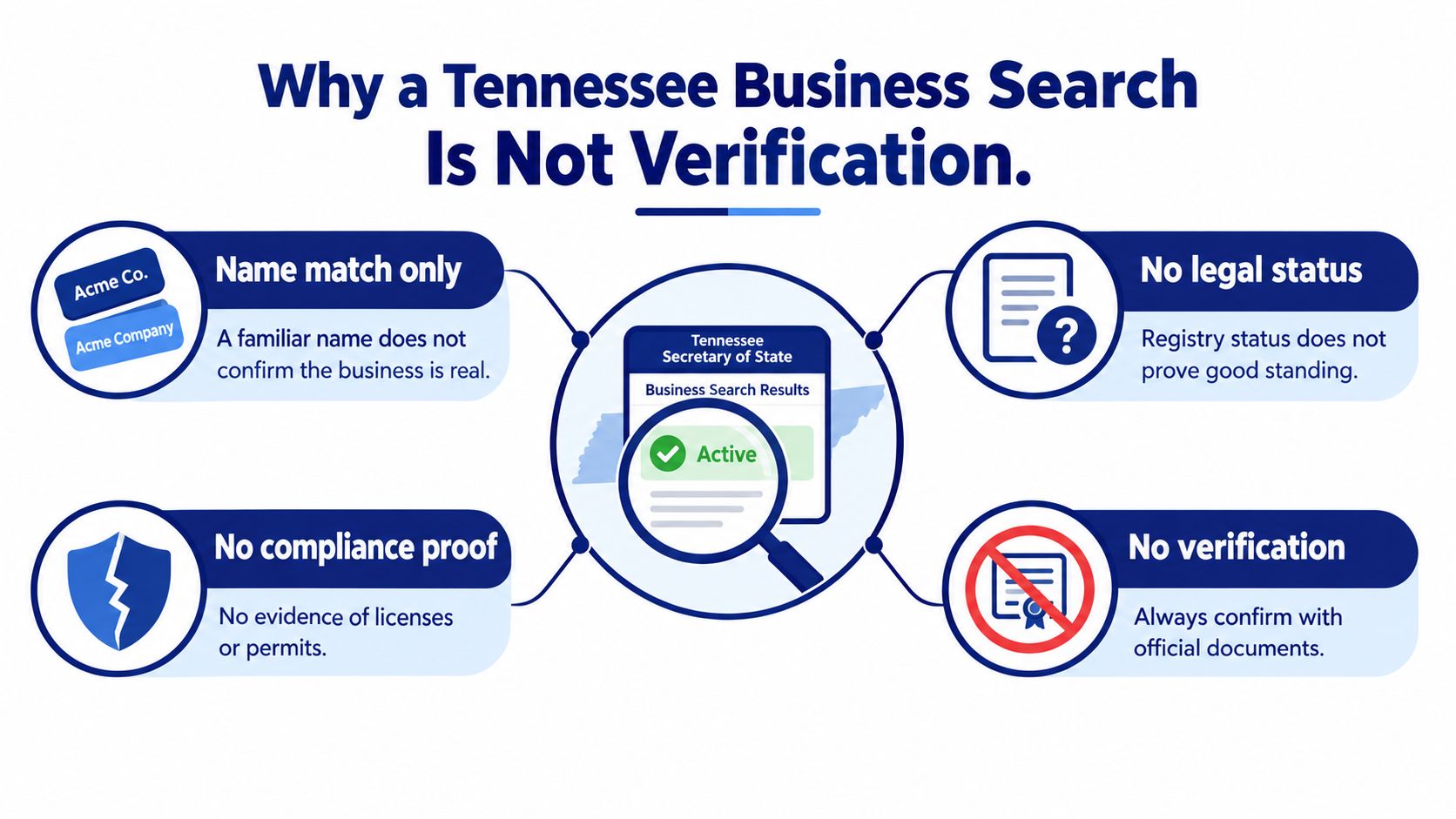
The distinction that matters most is database presence versus good standing. Under the state guidance linked above, good standing depends on an active listing, required formation or registration documents on file, required annual reports submitted, and required fees paid. An entity-name match, or even an active listing, does not confirm that all of those conditions are met.
Each registry field feeds a different decision:
- Status informs the compliance call, but only for the date you pulled it.
- Names, agent, and addresses support identity matching against what the counterparty supplied.
- Filing history shows whether underlying documents exist and when you need to retrieve one.
- Control number is the stable identifier you normalize against in an API schema.
For teams designing an onboarding decision, preserve the individual findings rather than collapsing them into a single verified: true field. A broader company legitimacy review can also involve checks beyond a state registry.
Practical rule: Treat a search result as a dated snapshot of state records. Record what it supports, what remains uncertain, and what evidence would resolve that uncertainty.
The reliable path is discovery first, field-level review next, then document follow-up when the decision warrants it. That turns a manual lookup into an auditable decision process.
Prepare the Right Tennessee Search Inputs
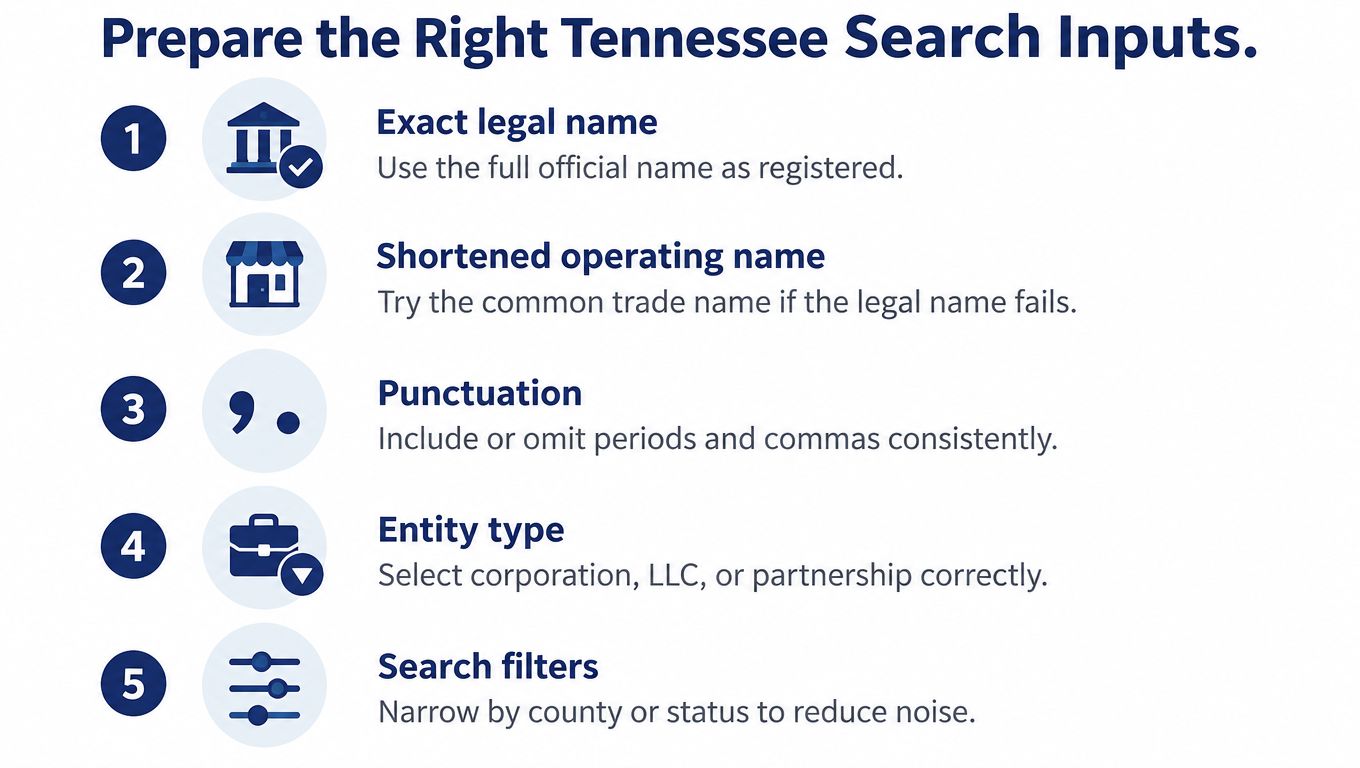
A search works better when you know what you're trying to identify. Before opening the registry, collect the name supplied by the business, any known legal name, the expected entity type and jurisdiction, an approximate formation period, and the address the counterparty provided. These details help distinguish similar records and make a no-result search less likely to be mistaken for proof that no entity exists.
Start with the exact legal name when you have it. If that returns nothing useful, try a shortened operating name and reasonable variations in punctuation or entity ending. For example, a customer might submit “River Bend Services, LLC,” while the state record uses “River Bend Services LLC.” The punctuation difference shouldn't end the search. If you have a control number, use it to target a known record rather than relying on a name alone.
Before searching, decide which job the lookup must do:
- Discovery: Find likely records using the legal name and useful variants.
- Known-record review: Confirm a specific entity using its control number and other identifying details.
- Name clearance: Research potential conflicts, then seek official confirmation before filing.
- Monitoring: Capture a baseline record so later changes can be compared against it.
Keep the original query, search filters, retrieval time, and selected record identifiers with the result. Those details make it possible to explain later what was searched and why a candidate was chosen. A search result without its query context is harder to reproduce and easier to misinterpret.
Run and Review the Tennessee Entity Search
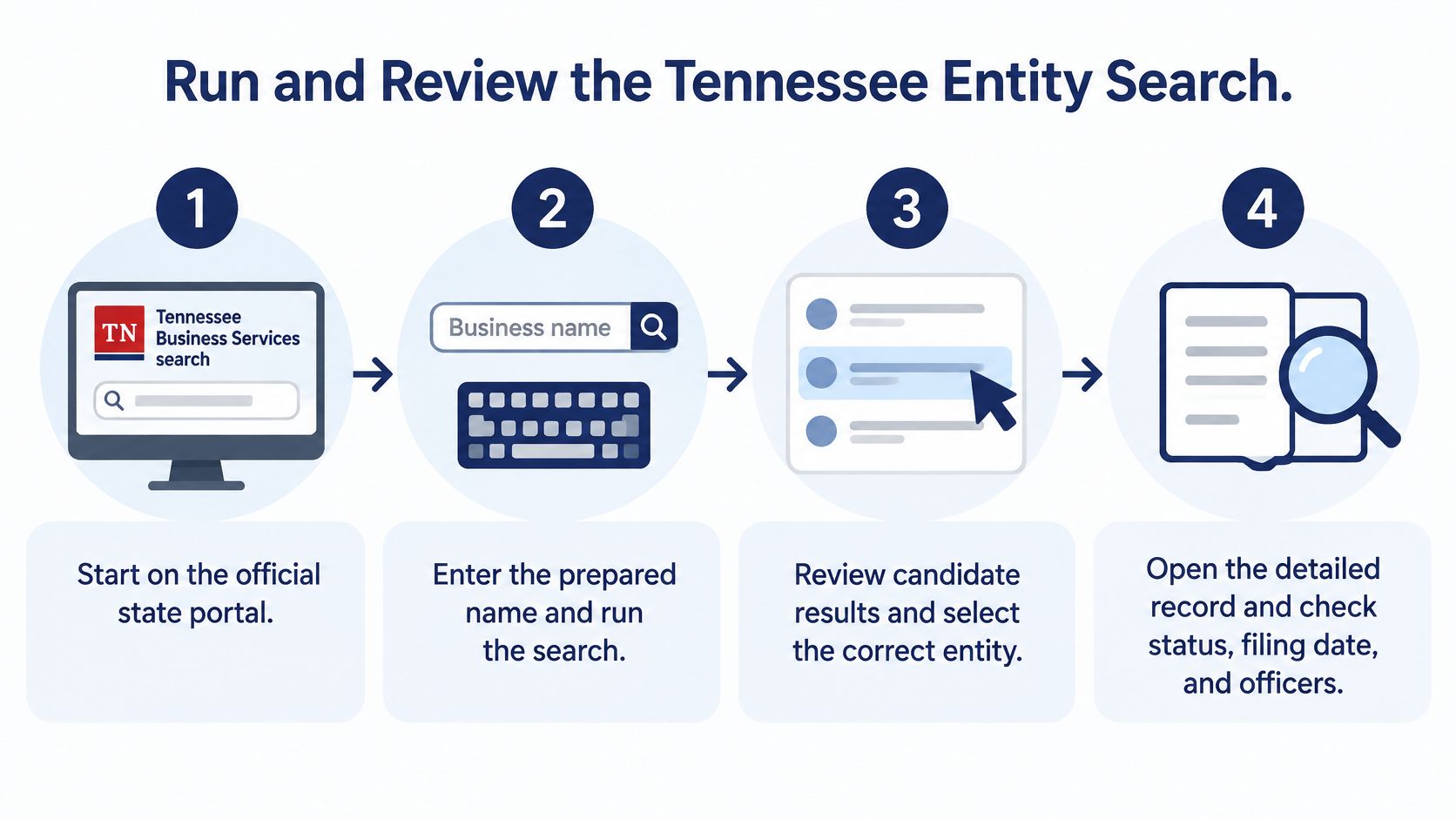
Enter the prepared name or identifier into the state's Business Information Search. Treat the result list as a set of candidates rather than an answer. The Tennessee Secretary of State presents business information and filing history at the record level, so open the detailed record for the entity that best matches the information supplied by the business.
Compare the record against the case file field by field: official name, control number, entity type, formation jurisdiction, initial filing date, status, principal-office location, and fiscal-year information where available. A candidate that matches the name but conflicts on entity type or jurisdiction may be a different organization. The control number is especially useful when names are similar, because it gives the review a more specific record identifier than a name fragment.
Consider a file for "Cedar Valley Holdings LLC" that returns several similar LLC names. One candidate may be registered in another jurisdiction, while another carries a different control number and formation information from the business in your onboarding record. Compare those attributes before selecting a result.
A shared phrase in the name does not establish identity.
Once you have a likely match, read its filing history. Note the dates and types of visible filings rather than treating the latest screen as a complete narrative. Amendments or annual reports may explain a changed address, updated entity information, or a status change. Tennessee states that the filing history of every business appears in the Business Information Search, per the business services guidance cited earlier.
A likely match still requires field-level review before you decide what the record supports; a missing candidate instead calls for more name variants or information from the counterparty.
Interpret Status Reports and Filing History
A detailed record holds several distinct signals. Separate the entity's identity from its current status, annual-report position, registered-agent information, principal address, fiscal-year details, and filing documents. Each field answers a different question: identity selects the record, while status and filings supply evidence about its recorded history and compliance position.
An active listing is not interchangeable with good standing. The earlier discussion established that Tennessee ties good standing to filed documents, submitted annual reports, and paid fees, as outlined in the guidance cited earlier. The practical consequence here is that an active vendor with a questionable annual-report position needs filing-level review rather than a decision inferred from the status label. Check the report history before treating status as settled.
Read filings as dated events
Treat each filing as a dated event in an evidence chain. A newer annual report or amendment may be relevant to a current review, but the date alone does not establish what changed. When an address or agent differs from information already on file, preserve the old and new values with their associated dates instead of overwriting the prior value. That habit lets you reconstruct which value was current on a given date, which matters when a contract or approval decision references a specific point in time.
Tennessee requires corporations, limited partnerships, LLCs, and business trusts organized in the state or doing business there to register and file annual reports. The state's business setup guidance also notes that missing an annual report deadline can lead to administrative dissolution and inactive status (Tennessee business setup guidance). Report history therefore works as a monitoring signal, since a gap or late filing can precede a status change.
Escalate when the evidence is incomplete
Save the record as it appeared at retrieval time, along with the query, relevant dates, and filing references. If the displayed information does not settle a question with legal or financial consequences, inspect the underlying filing, use available official services, or verify the detail directly with the entity. Do not report a field as confirmed when the record only suggests it.
Lenders, procurement teams, and KYC operations feel this most. A search supports a decision; an ambiguous record should route to review instead of automatic approval.
Choose the Right Search for Name Clearance
Name research and entity verification have different endpoints. When you're checking a proposed name, a search result can identify potential conflicts, but it doesn't itself establish legal availability. Tennessee provides a separate name-availability service, so a keyword search should be treated as screening rather than formal clearance.
An initial business-name query is a sensible first pass when a founder or filing workflow needs to identify obvious conflicts. Searching active entities can reduce distractions when the immediate question is whether a name appears to be in current use. But an active-only filter can exclude inactive records that may still matter to a name decision. A broader search gives more historical context, although it can return records that aren't a current operational match.
Keyword results also don't resolve every naming distinction. Punctuation, abbreviations, entity endings, reserved names, and registered names may require closer review. A result that looks different at a glance may still warrant confirmation, while a result that looks similar may not settle the legal question.
Use a decision path, not a single query
For a formation workflow, first search the proposed name and close variants to screen likely conflicts. If the result is unclear, broaden the search to include historical records and variations in punctuation, abbreviations, and entity endings. Save the query and result with its retrieval time, then use Tennessee's separate name-availability service before treating availability as settled.
This matters to software teams building repeatable filing checks. A manually typed phrase with no retained evidence is difficult to audit, and a single active-only search can hide context that a broader review would reveal. For a focused starting point, a Tennessee LLC name search can help organize the initial research, but it doesn't replace official confirmation from the state.
Map Tennessee Fields to a Normalized API Schema
A registry record becomes more useful to an engineering team when each value has a defined type and decision role. Tennessee records can include an official name, formation jurisdiction, initial filing date, fiscal-year information, principal-office location, member count where applicable, and related registration details. Preserve those concepts separately rather than flattening them into a search-result object with one status flag.
| Tennessee Field | Normalized Type | Suggested Field | Decision Use |
|---|---|---|---|
| Official name | Identity text | legal_name |
Match the entity's recorded name against onboarding data |
| Control number | Identifier | source_entity_id |
Distinguish similar records and target follow-up searches |
| Entity type | Classification | entity_type |
Apply the correct review rules for the record type |
| Formation jurisdiction | Jurisdiction | formation_jurisdiction |
Compare where the entity was formed with the business's claim |
| Initial filing date | Date | formation_date |
Establish a dated point of formation evidence |
| Status | Status value | source_status |
Record the state's displayed status without inferring compliance |
| Annual-report history | Filing events | annual_report_events |
Review filing sequence and potential compliance gaps |
| Registered agent | Party | registered_agent |
Compare the recorded agent with the case file |
| Principal address | Address | principal_address |
Compare locations while retaining dated changes |
| Member count, where applicable | Count | member_count |
Preserve a registry value without assuming it exists for every entity |
| Filing documents | Document references | filing_documents |
Retrieve source material for decisions that need stronger evidence |
Preserve context and uncertainty
Keep source_jurisdiction, retrieved_at, the original query, and the raw state values alongside normalized fields. A normalized status should not become a generic verified boolean: an active state record and a good-standing determination aren't the same conclusion. Addresses should retain effective dates or filing-event references so a current value doesn't erase evidence of a prior one.
Nullable fields need explicit semantics. A missing registered-agent value might mean the source didn't return it, the field wasn't present, or the record couldn't be matched confidently. Those states shouldn't be represented as if the value were definitively absent. Preserve the raw response or source text where permitted, and keep ambiguous candidates available for review rather than promoting a best guess to a confirmed match.
For teams designing a company data API, this structure makes state-specific evidence usable across products without pretending every jurisdiction reports information in the same way. It also gives compliance teams a trail from the normalized decision back to the registry field and retrieval context.
Build a Repeatable Search and Monitoring Workflow
A dependable workflow starts before the query and continues after onboarding. Prepare legal-name and operating-name variants, record the query and retrieval time, then compare candidate records using stable identifiers and corroborating details. Review status separately from good-standing evidence, inspect annual reports and amendments, and preserve the filings or references that support the decision.
Monitoring matters because a point-in-time record can become stale. For a lender reviewing a borrower or a procurement team onboarding a vendor, later changes to status, registered-agent information, addresses, or filing history may affect the original assessment. Treat the initial search as a baseline, then define which changes should trigger a new review and who is responsible for resolving them.
A practical decision policy can stay simple:
- Approve: The identity matches, the required status and filing evidence meet your policy, and no material question remains.
- Reject: Reliable evidence shows the entity doesn't meet a defined requirement.
- Review manually: The match is ambiguous, a relevant field is missing or inconsistent, or the decision carries consequences that require source documents or direct confirmation.
Teams operating across jurisdictions can also use a developer-focused API instead of building a separate integration for each state. SOSfinder offers a single REST endpoint for business-entity records across the states and the District of Columbia, with normalized fields and options for filing-history retrieval and change monitoring. Its entity search API overview describes an approach for teams that need to connect search and monitoring workflows across registries.
The core operating principle is straightforward: preserve what the state showed, distinguish observation from conclusion, and set a clear escalation path for unresolved questions. That keeps a registry lookup useful without asking it to prove more than it can.
If you're building Tennessee checks into onboarding or compliance operations, start by documenting the fields your decision depends on and the evidence you'll retain for each search. For multi-state workflows that need normalized registry records, filing-history access, or change monitoring through one API, explore SOSfinder.