Webhooks Push Notifications: Secure Setup for SOSfinder

At 9 a.m., a tracked company changes its registered agent. You want that change in your compliance queue by 9:01, without an analyst refreshing the registry. Your endpoint already accepts POST requests, but accepting a request isn't the same as safely updating a compliance record.
That timeline is a workflow target, not a promise about registry detection speed. When engineers connect webhooks, push notifications, and business records, the difficult part is preserving the right state through forged requests, duplicate deliveries, and delayed updates.
How a Change Becomes a Webhook Event
A webhook is the machine-to-machine message. A push notification is the human-facing alert your application chooses to send afterward. Our monitoring alerts users when a tracked company changes status, registered agent, or address.
Keep those responsibilities separate. Your receiver should preserve an authenticated change even when nobody needs an immediate alert. Otherwise, muting notifications can accidentally mean losing your audit history.
The flow separates source detection from delivery to your application:
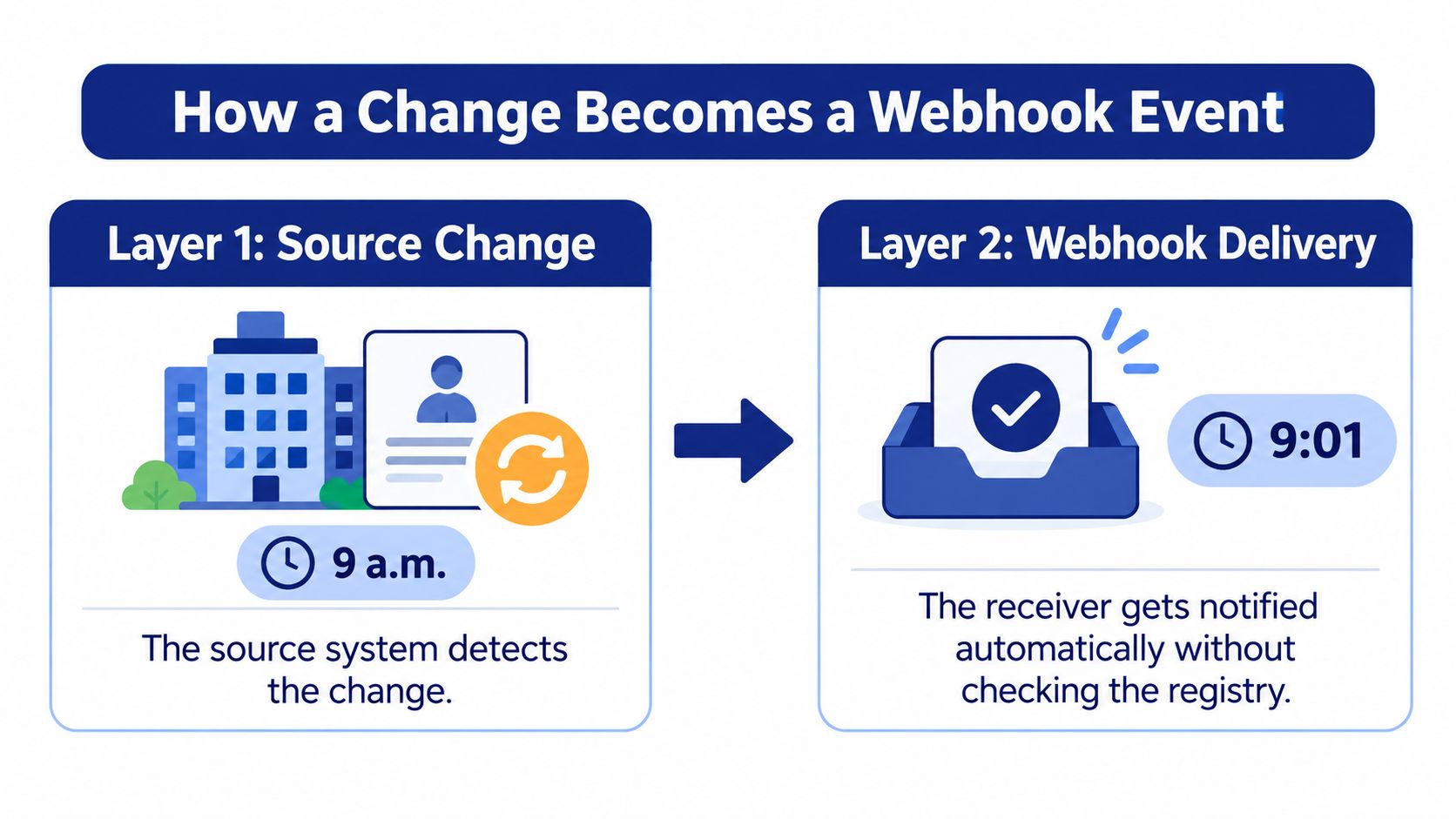
Separate receipt from escalation
Build the pipeline around explicit handoffs:
- Detect: The monitoring process identifies a registry change.
- Deliver: The sender posts the event to your registered endpoint.
- Preserve: Your receiver authenticates the request and durably stores the event.
- Decide: A worker applies business rules, updates the entity record, and creates any necessary human alert.
Behavior-triggered messages achieved a 14.4% open rate, compared with 4.19% for generic pushes, in the app-notification benchmark summarized by WiserNotify. Those are app engagement figures, not webhook delivery guarantees, but they support a useful design choice: notify people about meaningful events rather than forwarding everything.
For example, a status transition affecting onboarding might create a review task, while a formatting-only address correction stays in the audit trail. Give each alert an entity identifier, jurisdiction, changed value, and a clear action.
Practical rule: Receive and store every valid subscribed event. Alert only on an explicit shortlist.
Choose the three change types that should page a person and the event type that should only be logged. Make that decision before connecting the notification channel.
How to Set Up Your Receiving Endpoint
Start with a durable inbox, not a handler that calls your CRM before responding. The inbox becomes the boundary between accepting responsibility for an event and completing its downstream effects.
Keep credential management on the server side:
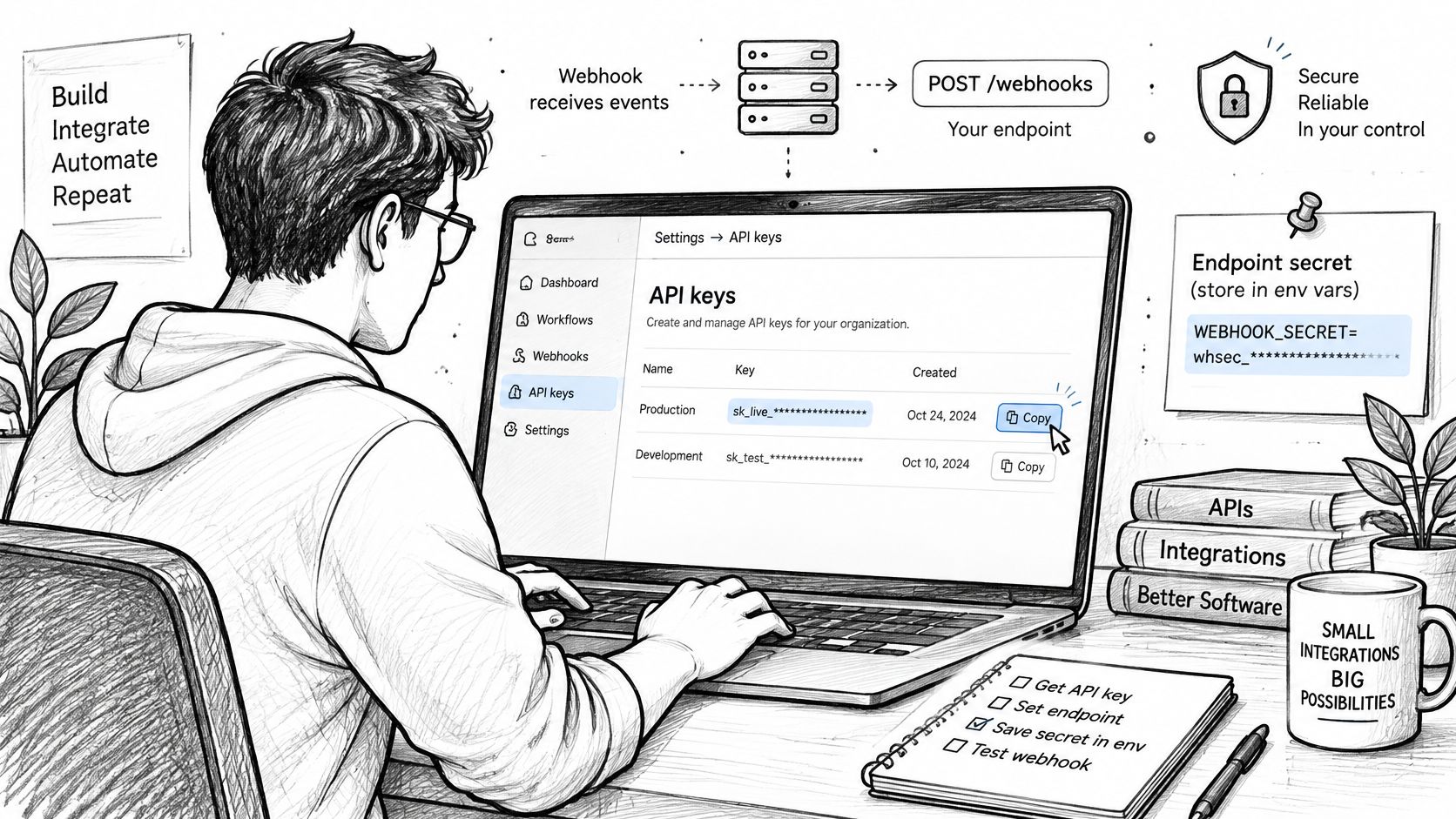
Build the receiving boundary
Retrieve your credentials. Open the dashboard under Settings → API keys and store your key securely when it's issued. Keep API credentials distinct from any endpoint signing secret, because they serve different purposes.
Configure server-side secrets. Store API keys in environment variables rather than source code. Keep any webhook signing secret there too, and never ship either credential in browser code or frontend build variables.
Create the route. Accept POST requests over HTTPS with a JSON content type, a bounded body size, and raw-body access. Register the final destination directly rather than relying on an HTTP upgrade or trailing-slash redirect.
Persist before acknowledging. Authenticate the request, validate its structure, and commit the event to durable storage before returning a successful response. Use a transactional outbox or a worker that polls the inbox so a crash between storage and queue publication can't strand the event.
Register the destination. Follow the documented webhook configuration for the endpoint URL and supported event subscriptions. Confirm the actual payload schema and signature protocol rather than copying assumed field or header names.
Map the event into your inbox. Preserve the original bytes with access controls and a retention policy. Store normalized fields separately so operators can search without opening full payloads.
Webhook payload fields to map
| Field | What it holds |
|---|---|
| Event ID | Stable identifier used for deduplication and log lookup |
| Event type | Kind of change, used to route alerts |
| Entity identifier | The tracked company the change belongs to |
| Jurisdiction | Registry where the change was filed |
| Changed field | Status, registered agent or address |
| New value | Value after the change |
| Timestamp | When the change occurred, used for ordering checks |
These are mapping targets, not a claim about literal JSON property names. Distinguish occurrence time, detection time, and delivery time wherever the schema exposes them.
Use this walkthrough alongside your staging setup:
Finish with a signed staging delivery. If the playground provides lookup JSON rather than webhook delivery, use it to inspect entity fields, then use a separate webhook fixture to exercise the receiver. Confirm that you can find the stored event and its acknowledgement by event ID.
Verify Signatures and Block Replayed Requests
HTTPS doesn't prove who sent a webhook. Anyone who discovers the destination can attempt a POST. Your receiver needs to authenticate the sender, establish freshness, and recognize an already accepted event.
The OWASP Webhook Security Cheat Sheet recommends combining timestamp-based replay protection with authenticated event-ID deduplication. A captured request can retain a valid signature, so signature verification alone isn't enough.
Run checks in a deliberate order
- Prevent byte mismatches. Capture the raw request body before JSON middleware transforms it. Parsing and serializing JSON can change whitespace or key order without changing its apparent meaning.
- Reject forged requests. Follow the sender's documented signing algorithm, timestamp encoding, and signature format. For an HMAC-based scheme, recompute the authentication code with the per-endpoint secret and use a constant-time comparison.
- Reject stale requests. Require the timestamp to be part of the authenticated material and enforce a short configured tolerance, including excessive future skew. Don't widen the window to conceal an unsynchronized server clock.
- Reserve the authenticated identity. After verification and schema validation, insert the event ID using a database uniqueness constraint. Commit the inbox record before acknowledging receipt.
The ordering matters because unverified payload fields must never become trusted deduplication keys. Otherwise, an attacker could preempt a legitimate event by submitting its identifier first.
Use this checklist when reviewing the receiver:
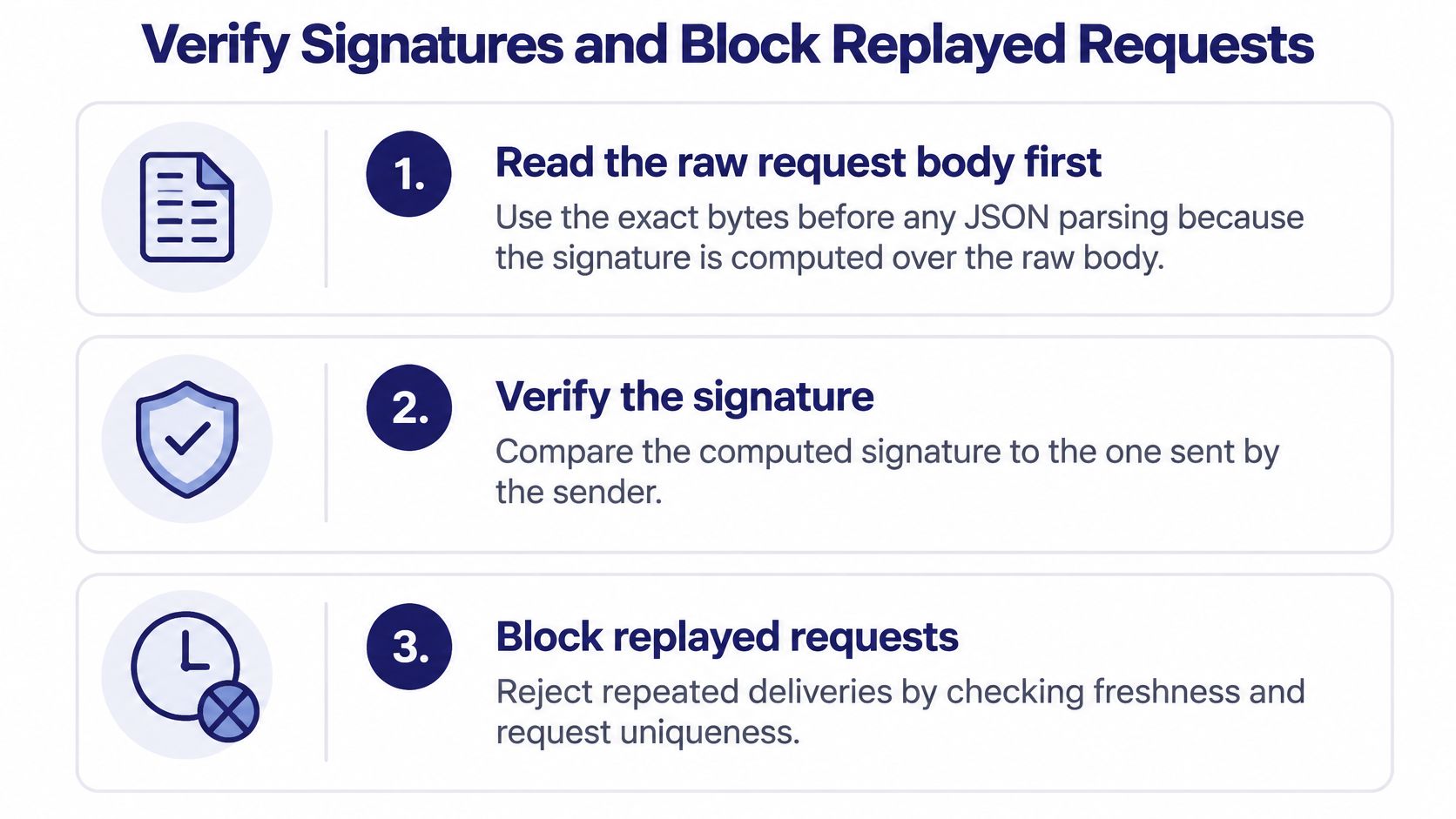
Separate identity from state ordering
Deduplication prevents repeated handling of the same event. It doesn't establish which entity value is newest. For registry updates, compare a provider sequence, monotonic version, or suitable filing date before changing the current record.
Say an older registered-agent event arrives after a newer filing. Preserve the older event for audit, but don't let it replace the newer agent. If ordering metadata is insufficient, reconcile the entity instead of guessing from arrival time.
Return an appropriate client-error response for invalid requests and log the rejection reason without exposing secrets or unnecessary payload content. Review our authentication documentation for credential handling; don't assume API authentication and webhook signing use the same mechanism.
If you believe an API key has been exposed, contact support@sosfinder.com immediately. No payload field should influence business state until the request passes authentication and validation.
Retry Handling and Duplicate-Safe Processing
Design for at-least-once delivery. A sender can retry after your database commits if the acknowledgement disappears in transit, so duplicate delivery is an expected condition.
Reference retry schedule after a failed delivery
The intermediate timings below are an illustrative configuration, not a statement of SOSfinder's delivery policy. The documented provider policy governs.
| Attempt | Elapsed time since first attempt | What it usually catches |
|---|---|---|
| Initial | At dispatch | Initial delivery |
| Next | For example, a minute | Brief network blips |
| Following | For example, several minutes | Short timeouts or a restarting service |
| Later | For example, half an hour | Deploy windows and load spikes |
| Extended | For example, a couple of hours | Longer endpoint outages |
| Maintenance retry | For example, several hours | Extended maintenance |
| Incident retry | Later in the retry window | Prolonged incidents |
| Final | At the configured window boundary | Last attempt before dead-letter handling |
The Svix webhook reliability guide describes approximately 8 attempts over 24 hours as a common production pattern and treats only HTTP 2xx responses as successful delivery. Timeouts, connection failures, redirects, and other unsuccessful responses enter retry handling.
Keep retries from becoming another outage
Use exponential backoff with jitter when building a sender. Backoff spaces repeated attempts apart; jitter prevents recovering endpoints from receiving synchronized bursts. Honor Retry-After where the delivery implementation supports it, and cap the retry window.
On the receiving side, acknowledge an already accepted event without repeating its business effects. Don't return an error just because the unique-ID insert found an existing durable record. That would encourage more retries of an event you already own.
A successful acknowledgement means you've accepted responsibility for the event, not that every downstream system has finished processing it.
Your internal worker needs its own retry policy. Track accepted, processing, completed, and failed states so a crashed worker doesn't turn a deduplication record into permanent lost work.
Make recovery observable
Record event ID, entity identifier, jurisdiction, event type, attempt number, response code, latency, and next retry time wherever that delivery information is available. Separate sender-attempt logs from internal job-attempt logs.
Review our rate-limit documentation before designing recovery traffic, but don't confuse API request handling with webhook redelivery policy. Pace replay operations according to the documented interface and your receiver's capacity.
Move exhausted deliveries into a monitored dead-letter workflow. Require replay tooling to preserve original event identity, and measure eventual delivery within the retry window, not just whether the initial request succeeded.
Test Your Endpoint with cURL, Python and JavaScript
Generate a sample lookup in the API playground and compare the returned entity fields with your parser. Then obtain a webhook-specific fixture: lookup JSON doesn't establish the webhook envelope, signature headers, or signing format.
Our API integration example provides integration context. Keep receiver tests independent so an API lookup succeeding can't conceal a broken webhook path.
Send the bytes you signed
The following is a local test convention, not a documented SOSfinder signature protocol. It assumes X-Test-Timestamp, X-Test-Signature, and an HMAC over timestamp, a period, and raw body bytes; replace that convention with the sender's actual specification.
With BODY_FILE, ENDPOINT_URL, SIGNED_TIMESTAMP, and SIGNATURE set by your fixture generator, send:
curl -X POST "$ENDPOINT_URL" \
  -H "Content-Type: application/json" \
  -H "X-Test-Timestamp: $SIGNED_TIMESTAMP" \
  -H "X-Test-Signature: $SIGNATURE" \
  -T "$BODY_FILE"
Use a fixed fixture file so signing and transmission read identical bytes. Avoid generating JSON separately in the signer and HTTP client.
In a Python handler, the verification core can look like this, with the algorithm supplied by your test configuration:
raw = request.get_data(cache=True)
timestamp = request.headers.get("X-Test-Timestamp", "")
signature = request.headers.get("X-Test-Signature", "")
signed = timestamp.encode("ascii") + b"." + raw
expected = hmac.new(secret, signed, digestmod=algorithm).hexdigest()
if not hmac.compare_digest(expected, signature):
    abort(401)
if not timestamp_is_fresh(timestamp, tolerance):
    abort(401)
Reject missing or malformed header values explicitly. timestamp_is_fresh must parse the timestamp safely and check both stale and future values.
For Node.js, mount raw-body middleware before JSON parsing on this route. With raw, secret, algorithm, and validated header strings available, the equivalent core is:
const expected = createHmac(algorithm, secret)
  .update(Buffer.concat([Buffer.from(timestamp + "."), raw]))
  .digest();
const received = decodeSignatureStrictly(signature);
if (received.length !== expected.length ||
    !timingSafeEqual(received, expected)) {
  return res.sendStatus(401);
}
if (!timestampIsFresh(timestamp, tolerance)) {
  return res.sendStatus(401);
}
Neither snippet is a complete receiver. Add bounded reads, strict signature decoding, JSON schema validation, durable acceptance, and worker dispatch.
Assert the response and the stored result
Endpoint test cases and expected results
| Test case | What to send | Expected response |
|---|---|---|
| Valid event, first delivery | Correct signature and fresh timestamp | 2xx, processed once |
| Duplicate event ID | Same signed body sent again | 2xx, no second action |
| Altered body | Body changed after signing | Authentication rejection, no state change |
| Missing signature | Signature header removed | Authentication rejection, no state change |
| Stale timestamp | Timestamp outside the tolerance window | Authentication rejection, no state change |
| Malformed JSON | Valid signature, invalid JSON | Client error, no accepted event |
| Oversized payload | Body above your size limit | Payload-size rejection, no processing |
| Concurrent duplicates | Two identical requests at once | One processed, one acknowledged |
| Older event after newer | Earlier version arrives late | Acknowledged, stored current state unchanged |
A test passes only when both the HTTP result and persisted state match expectations. Check notification records too, because a correct entity row can still hide duplicate alerts.
Fix Common Webhook Failures and Confirm Go-Live
If every legitimate delivery returns 401, inspect the signing input before changing infrastructure. Parsed-and-reserialized JSON, the wrong endpoint secret, and an incorrect signature encoding can all make authentic requests fail verification.
Log a safe diagnostic fingerprint of the raw bytes in staging and compare it with the signing fixture. Never print the signing secret, API key, or complete sensitive record into a shared log.
Diagnose the failing boundary
Webhook symptoms, causes and fixes
| Symptom | Likely cause | Fix |
|---|---|---|
| Valid events rejected as stale | Server clock skew | Sync time with NTP and keep tolerance short |
| Retries arrive as 3xx | Redirect from HTTP or a trailing-slash change | Register the final HTTPS URL |
| Events processed twice | Slow acknowledgement and missing atomic deduplication | Save the event ID first, then queue the work |
| Newer address overwritten by older one | Updates applied in arrival order | Compare version or filing date before writing |
| Deliveries time out | Downstream calls run inside the request | Acknowledge durable receipt and move work to a queue |
| Events missing after an outage | Endpoint down past the retry window | Check available dead-letter records and reconcile affected entities |
Use our status-code documentation to distinguish API errors from your receiver's own responses. Identify which component emitted the failure: reverse proxy, authentication middleware, application handler, or downstream worker.
An outage also requires a state reconciliation, not merely replaying whatever remains available. Identify affected entities, compare their current registry records with your stored records, and record how each discrepancy was resolved. If the sender doesn't expose dead-letter access, use the available delivery diagnostics and reconciliation interfaces instead of assuming a recovery queue exists.
Go-live gate: Don't approve the endpoint because a sample POST returned success. Approve it because failures leave recoverable records and retries don't repeat business effects.
Release with evidence
Before enabling production delivery, verify these conditions:
- Security: Keys and endpoint secrets remain server-side in environment variables, and invalid-signature tests leave business state untouched.
- Durability: Each accepted event has a committed inbox record before acknowledgement, with a recoverable path to worker execution.
- Concurrency: Simultaneous duplicates can't create repeated updates or alerts.
- Ordering: A delayed registry event can't overwrite a newer accepted value.
- Operations: An operator can locate an event, explain its current state, and safely retry failed work.
- Alert routing: Only the chosen change types reach a person, with enough context to act.
This week, create an API key, exercise the playground, and send a signed fixture to staging. Track the share of events acknowledged successfully within the configured retry window alongside internal processing failures, so delivery success doesn't conceal a stalled worker. For questions our documentation doesn't answer, email support@sosfinder.com and our team will help.
SOSfinder offers normalized business registry data and webhook-based change notifications for downstream workflows. You can get an API key instantly on the free plan without a credit card, then use staging to validate your receiver before enabling production monitoring. Our Pro plan includes everything in Starter, plus monitoring for 25 entities with daily checks, UCC and officer lookup in beta, and webhooks.