Data as a Service Explained: Model, Uses and Providers
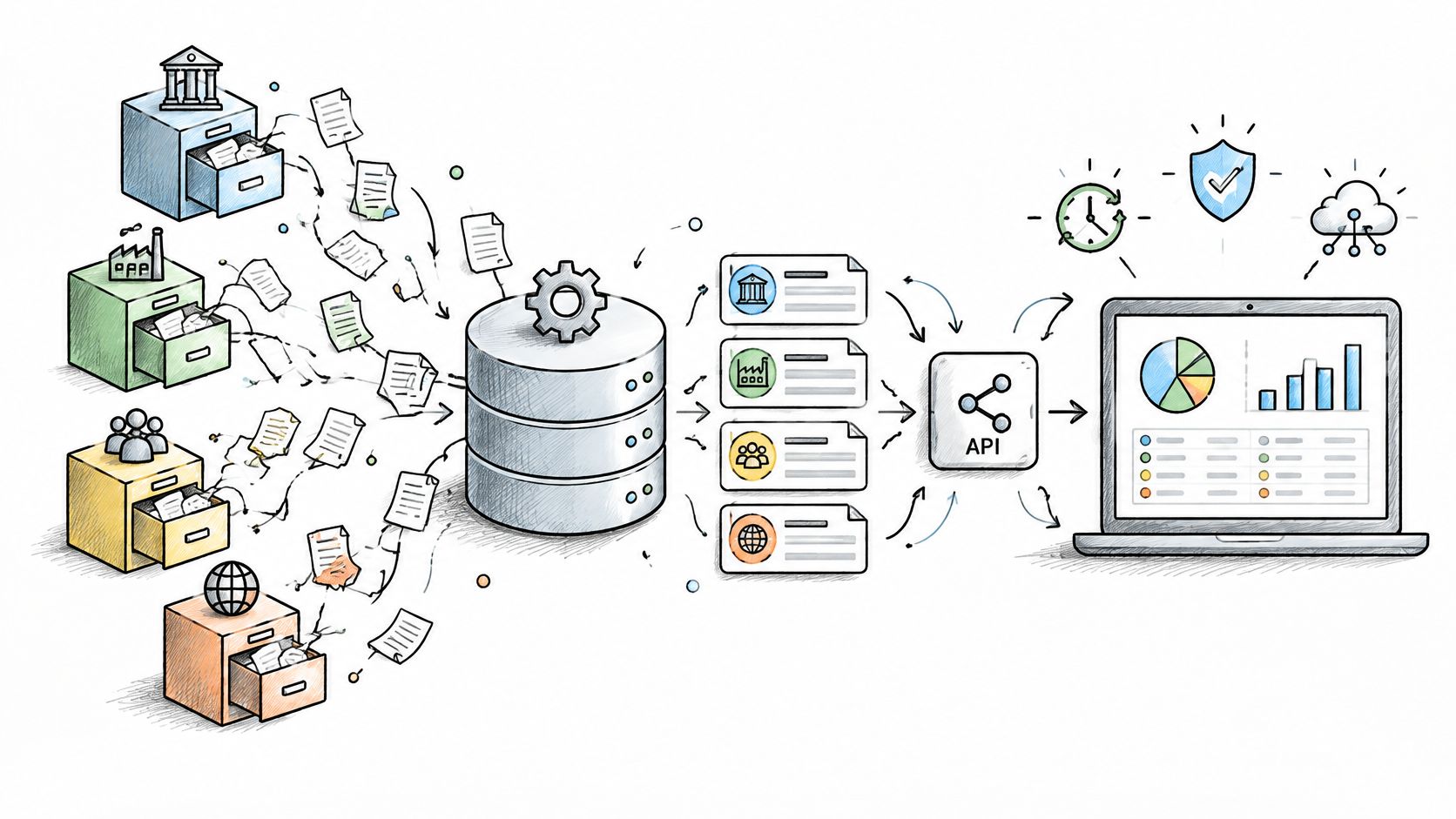
The most popular advice on buying external data is to pick the API with the cleanest schema and the highest uptime. That's the wrong test. A fast, consistent response can still be stale, ambiguous, or impossible to trace back to the official record that justified your decision. If you're building onboarding, underwriting, or vendor checks, reliability means evidence, not just availability. You need to know where each field came from, when it was retrieved, what the source said, and what changed since your last check.
What Data as a Service Means and Why It Matters
Data as a service means a provider collects, normalizes, refreshes, and serves data through an API or managed platform. Your product calls for the data when it needs it. You don't maintain the collection pipeline, the source connections, or the cleanup work behind that call.
Think of renting a shared commercial kitchen. You get maintained equipment and a working space without building the kitchen yourself, but you follow the landlord's schedule, rules, and capacity limits. Data as a service works the same way. You gain speed and shared upkeep, and you accept the provider's schema, refresh policy, permitted uses, and service terms.
Why buyers keep choosing this model
Demand is not hard to explain. Many teams need the same external records repeatedly, inside live workflows, and they don't win customers by maintaining scrapers. Mordor Intelligence's data-as-a-service market report estimated the market at USD 24.88 billion in 2025 and projected it to reach USD 61.18 billion by 2031. That projection reflects a practical shift. Companies are paying for reusable data infrastructure instead of rebuilding collection for every product, market, or compliance check.
Business entity data shows the model clearly. SOSfinder provides one REST endpoint that looks up any business registered in all 50 states and DC, returning status, registered agent, formation date, and filings. Your code sends one kind of request. The provider handles fifty registry interfaces behind it, each with its own format, terminology, and failure modes.
That single endpoint is the point, and also the risk. It removes integration work, but it can hide real differences between jurisdictions if the response doesn't preserve the source value beside the normalized one. A state term that means one thing in Delaware may not mean exactly the same thing elsewhere. Good data as a service makes records comparable without pretending the underlying registries are identical.
Four ways to get entity data
Delivery models for business and entity data
| Model | Who maintains sources | Refresh | Integration effort | Best fit |
|---|---|---|---|---|
| Build in-house pipelines | Your team | Whenever your team schedules it | High | Internal or proprietary sources |
| Bulk dataset purchase | Vendor, delivered as files | Periodic file delivery | Medium | One-off research or analysis |
| Data as a Service API | Provider | On request, or from cache | Low | Live checks inside products and workflows |
| Data platform with analytics | Provider and your team | Scheduled by the platform configuration | Medium to high | Dashboards and warehousing |
The differences matter most when the data changes after you receive it. A bulk file is a snapshot. It's fine for a one-time market study, but it ages from the moment it's delivered. An in-house pipeline gives you control, yet every registry change, block, and parser failure becomes your incident. A platform with analytics helps when the main job is warehousing and reporting, not answering a live question inside a signup form.
Practical rule: Choose data as a service when you need the same records repeatedly and collecting them isn't your competitive advantage.
That rule filters out most bad fits. If the dataset itself is your product, or the source is private and only you can access it, build internally. If you need current entity status at onboarding, then again before payment, then again during monitoring, you're buying repeated access to a maintained capability. That's exactly what data as a service is for, provided the response carries enough provenance for you to defend the decision later.
How a DaaS Layer Turns Registries into API Responses
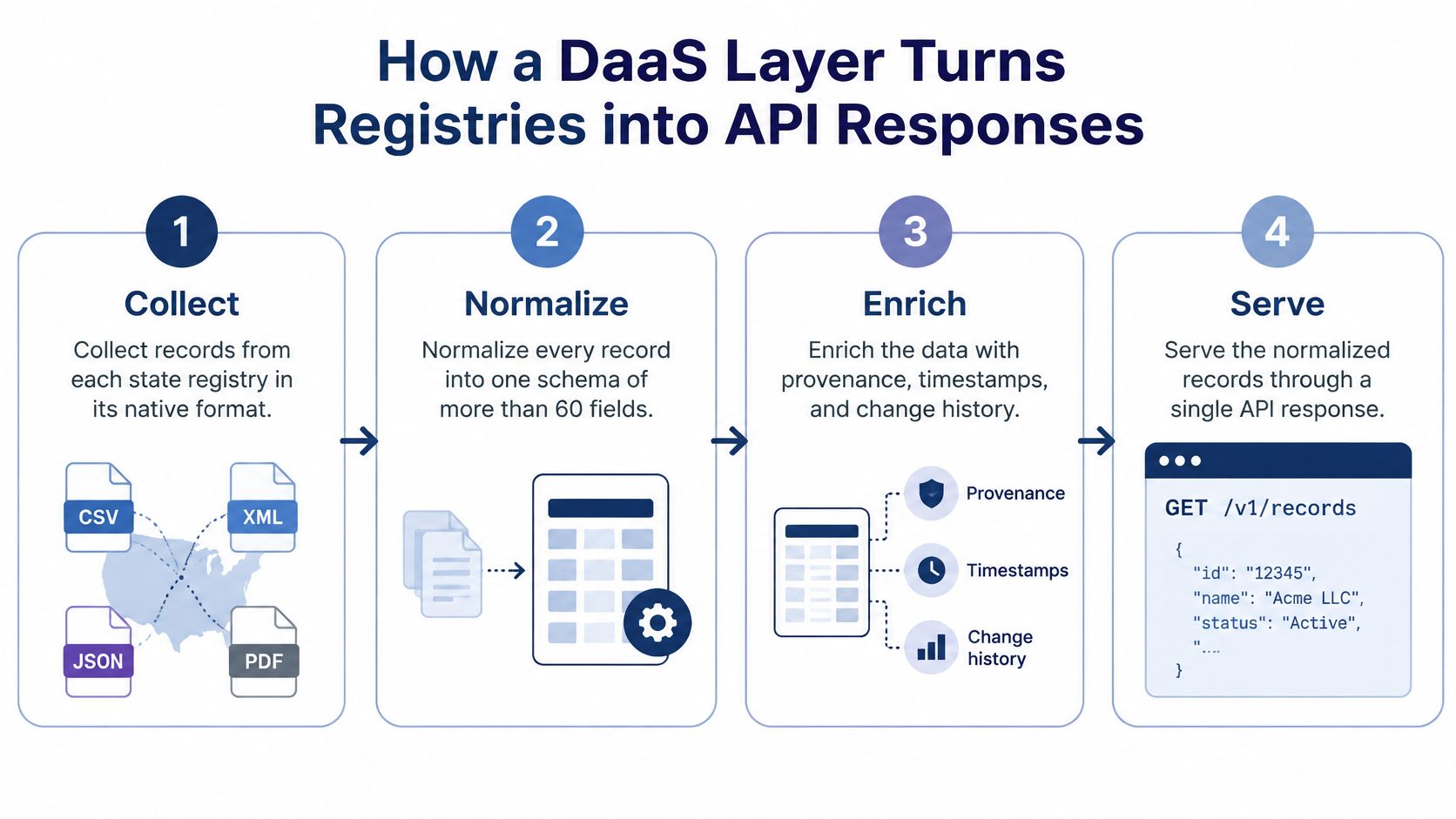
A registry lookup looks simple from the caller's side. Behind the endpoint, the provider runs a pipeline that has to absorb fifty different sources and still return one predictable record. Each step exists for a specific reason, and skipping any of them creates a different kind of failure.
Here's how that transformation flows from raw registry formats to a single response.
The five steps behind one response
- Collect from each registry in its native format. States publish records through different interfaces, search rules, and document systems. The provider retrieves what is there first, before interpreting it, so the original record remains the reference point.
- Normalize into one schema. Every record maps into the same structure of more than 60 fields, so your parser doesn't change by state. The state's original values stay beside the normalized ones, because normalization that erases the source wording also erases your audit trail.
- Store timestamps and provenance for each field. A record-level retrieval time isn't enough when fields refresh at different rates. Field-level provenance tells you which jurisdiction supplied a value, which source record it came from, and when it was last retrieved.
- Cache with time-to-live values set by volatility. Fields that rarely change can live in cache longer. Fields that drive compliance decisions can't. This step controls both speed and staleness, which is why it deserves its own policy rather than a single global setting.
- Serve through one REST endpoint. You authenticate with a secret key from your server, pass a name and a state, and receive a normalized entity record back. The jurisdiction becomes a parameter in your request instead of a separate integration in your codebase.
Caching is a consistency decision, not just a speed trick
Teams often treat caching as pure performance work. That's a mistake in a multi-jurisdiction API, where a cached answer is also a claim about how current the record is. AWS Well-Architected guidance on caching recommends identifying heavy read workloads as caching candidates, then configuring time-to-live (TTL) values that balance freshness against backend load.
Applied to entity data, that means splitting fields by how often they change. Entity identifiers and historical filings can generally tolerate longer TTLs. Status, registered agent, and address fields need shorter TTLs or event-triggered invalidation, because those are the fields that flip a decision from approve to review. One TTL for the whole record forces a bad trade. You either refresh stable fields wastefully or serve volatile fields past their safe age.
AWS also gives 80% or higher as a practical target for cache-hit rate. Below that level, the cache may be undersized or poorly aligned with request patterns. For the provider, a healthy hit rate means fewer repeated registry calls, less exposure to upstream throttling, and lower duplicated retrieval costs. For you, it means more predictable latency on repeat lookups of the same entities.
The pattern that makes this workable is stale-while-revalidate. The API returns a recently cached record within a defined staleness budget and refreshes it in the background. When a record passes its maximum permitted age, the API fetches from the source synchronously instead of serving the old copy. You get fast responses for routine checks and a hard ceiling on how old an answer can be.
Reliability plumbing sits underneath all of this. Connection pooling, client timeouts, retries, and exponential backoff keep a transient registry failure from becoming an outage in your product. If one state source slows down, your onboarding flow shouldn't hang with it. The provider absorbs that failure, retries with spacing, and returns either a fresh record, a clearly marked cached record, or a consistent error.
A healthy response includes a source timestamp, a freshness indicator, and explicit blanks for fields a state doesn't publish.
That last point matters more than it sounds. A missing field and an unknown field are different signals. If a state doesn't publish officers, the response should say so through an empty value you can interpret, not through an omitted key that breaks your parser or, worse, looks like a negative finding. Absence of data is not evidence of absence. Your decision logic needs to treat those cases separately, and the schema has to let it.
Business and Technical Benefits Over Building In-House
The core benefit is unglamorous. Your team stops maintaining fifty different registry interfaces. The work of checking for source changes, handling blocks, and fixing parsers when a state changes its site moves to the provider. That work never ends, it never differentiates your product, and it breaks at the worst times, usually when a registry changes something without telling anyone.
This comparison shows where that maintenance burden sits under each approach.
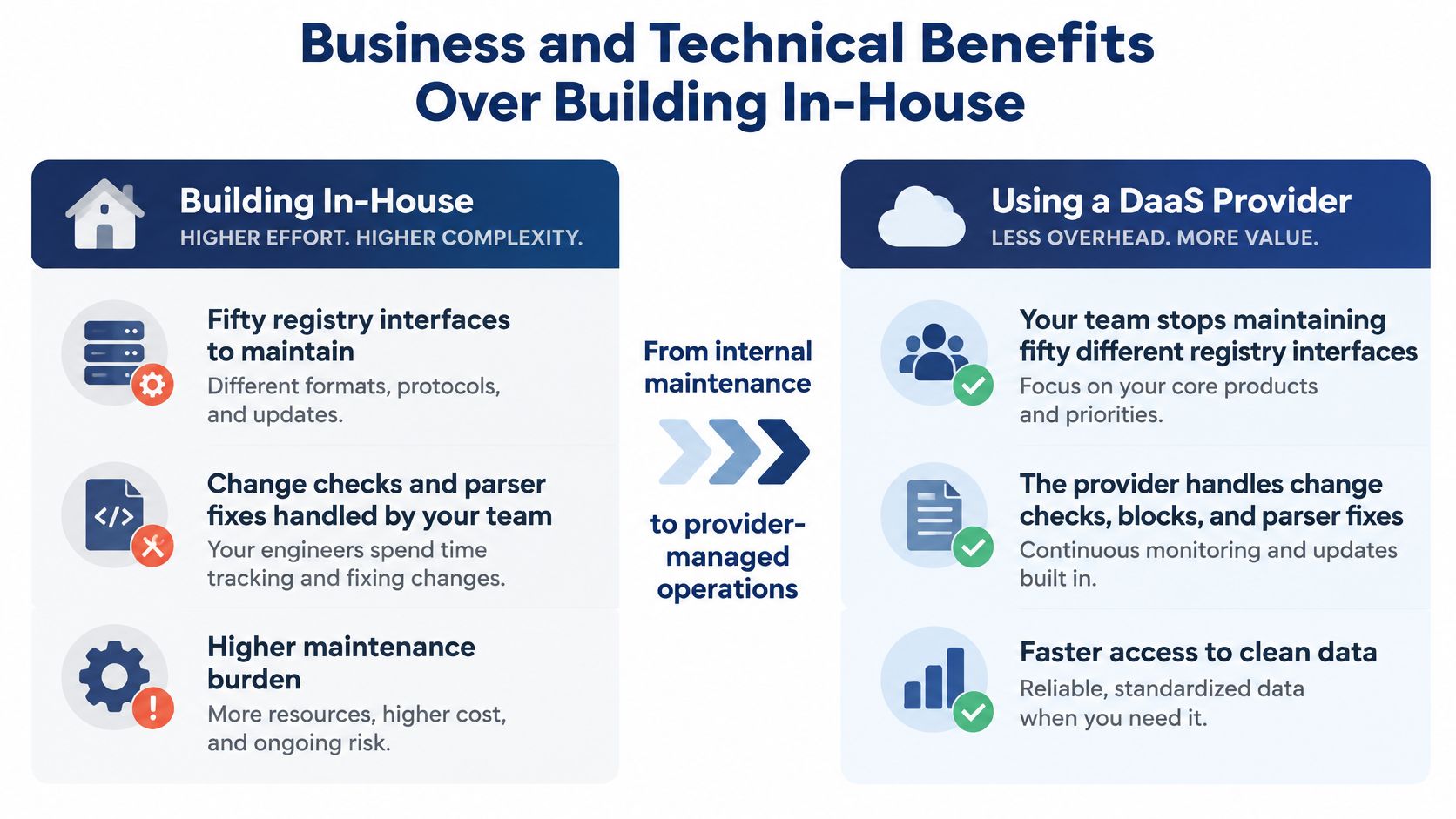
What your engineers get back
A consistent schema means one parser for all states. Your team writes entity logic once, tests it once, and passes the jurisdiction as a request parameter. Each record carries more than 60 normalized fields, and a state fills only the fields it publishes. Your code handles one shape of data instead of fifty shapes with fifty sets of edge cases.
That consistency changes how you read gaps. In an in-house system, a missing registered agent could mean the parser broke, the page layout changed, or the state never published it, and your team has to investigate which one. In a normalized response, a missing value is a signal about the source. If the schema is stable and the field is empty, the state didn't publish it. Your team routes that case to manual review instead of filing a bug against its own scraper.
Cost and speed change shape
Building state scrapers is a quarters-long project before you count maintenance. Integrating an existing API lets a team ship a verification step in days, because the collection, normalization, and error handling already exist. You're writing a client, mapping fields to your decision rules, and testing edge cases. That's product work, not infrastructure archaeology.
The cost structure changes with it. An internal pipeline is a fixed engineering commitment that you pay whether you run ten lookups or ten thousand. Usage-based billing turns that into a variable operating cost that scales with actual checks. For a team validating a new onboarding flow, that difference decides whether the project gets approved at all.
The trade-offs, stated plainly
- Dependence on one provider: Your verification step inherits the provider's uptime, pricing changes, and roadmap. If the provider has an outage during your peak signup window, your flow feels it.
- Accuracy capped by the source: The data is only as accurate as the public filing behind it. A business that filed an outdated address will return an outdated address, correctly normalized.
- Fields some states never publish: No provider can return data a registry doesn't release. Your coverage will always be uneven across jurisdictions, and your workflows must plan for thin records from some states.
- Less control over retrieval timing: You don't decide how the provider schedules source checks or sets cache policy. You can only evaluate whether the stated policy fits your risk tolerance.
None of these trade-offs disqualifies the model. They define what you must verify before you depend on it. The trade is acceptable when the provider's records carry clear provenance, the change history is visible, and the terms state plainly what's guaranteed and what isn't. If a provider can't explain its freshness policy or won't put its permitted uses in writing, the engineering time you save will come back as compliance risk.
Common Use Cases from Onboarding to Entity Monitoring
Say a procurement team is about to pay a new supplier for the first time. Before finance releases the payment, someone has to confirm the supplier legally exists, is active, and has a named registered agent who can receive legal notices. That check takes three fields, entity status, entity type, and registered agent, and it should happen once at onboarding and again before any large or unusual payment.
This is the setting where teams often first meet entity data, usually under time pressure.
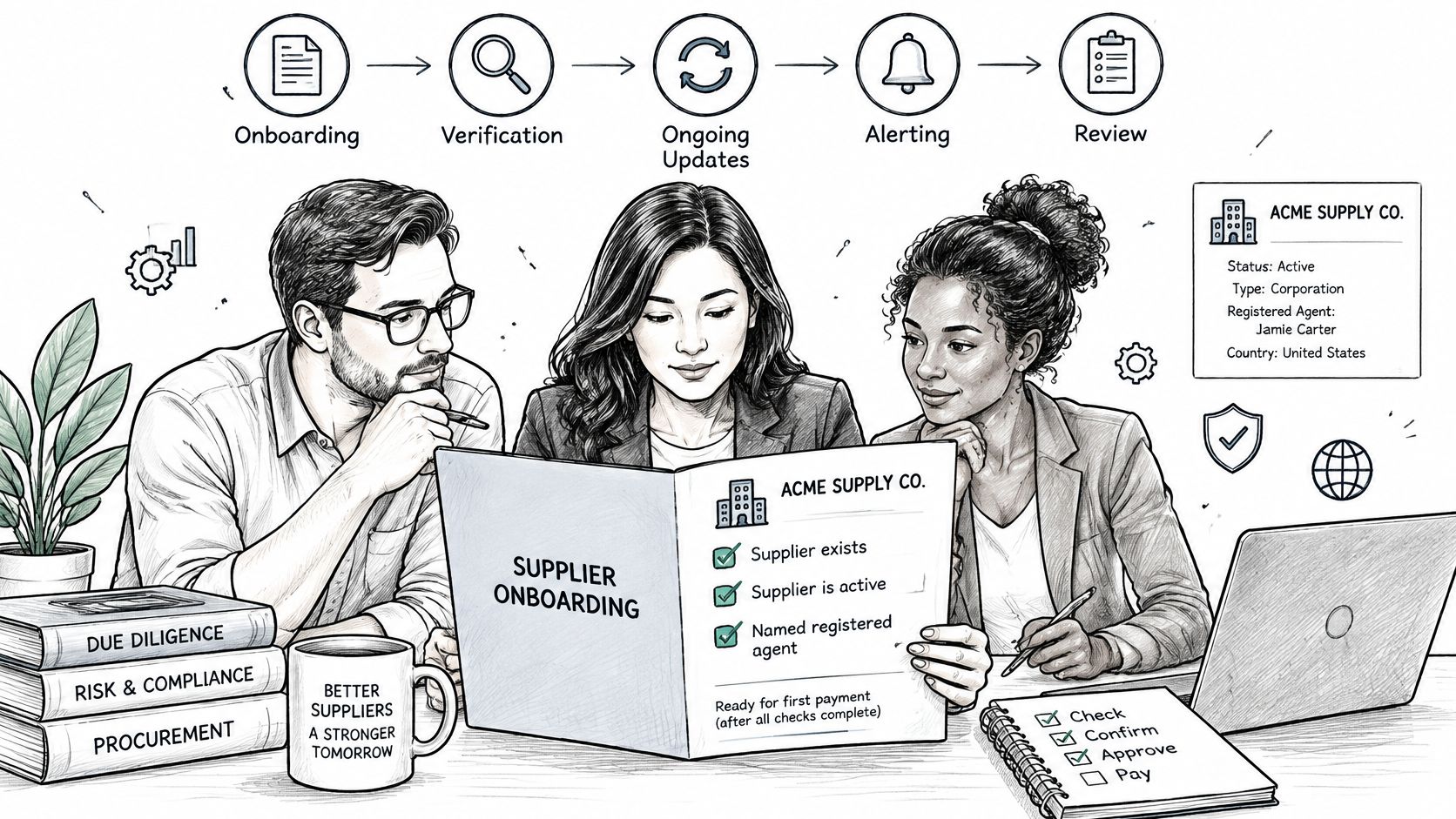
Where the same record drives different decisions
Customer and counterparty KYC at a fintech uses a similar record with different weight on each field. The compliance team cares about status, entity type, and officers, because those fields establish that the business is real, currently authorized to operate, and connected to identifiable people. The check runs at account opening, then repeats on the review cycle the risk policy sets. Teams designing these flows need to understand how entity verification fits beside identity checks on individuals, which is covered in this guide to CDD and KYC requirements.
Name clearance before formation sits earlier in the life of a business. A founder or filing service checks whether a proposed name is available in the target state before submitting formation documents. The fields that matter are existing entity names, status, and similarity to active registrations. Catching a conflict here avoids a rejected filing, a second fee, and a launch delay. This check runs once per name candidate, but often several times per formation as the client works through options.
CRM and lead enrichment uses entity data for qualification rather than compliance. A sales operations team appends formation date and status to account records, so reps stop chasing dissolved companies and can prioritize businesses that are active and established. A company formed last month and a company operating for a decade need different outreach. Refresh this data on a periodic cycle, quarterly works for most pipelines, because accounts go inactive and stale CRM records waste rep time every week until someone cleans them.
Lender and underwriting diligence digs deeper into the same record. An underwriter reviewing a loan application reads the filing history for amendments, dissolutions, and reinstatements, and watches for a recent change in registered agent or principal address. Those changes aren't automatically bad. They are prompts to ask why. A business that changed its agent and address in the month before applying for credit deserves a closer look than one with a stable ten-year filing pattern. This check runs at application and again before funding if time passes between the two.
The video below walks through how these verification steps fit together in a working onboarding flow.
Ongoing entity monitoring closes the loop. After onboarding, the entity keeps changing. Status lapses, agents resign, addresses move. A monitoring workflow watches for changes to status, registered agent, and address, then triggers a review when one occurs. A supplier that was active at onboarding and dissolved six months later is a payment risk your team won't catch by re-reading the original approval. Monitoring turns a point-in-time check into a standing control.
The boundary every workflow shares
Our terms list onboarding verification, CRM enrichment, underwriting and diligence, monitoring, and product building as permitted uses. That list covers the workflows above. It doesn't turn an API response into a final determination about a business or a person.
Decision principle: Treat an automated match as a lead for review, not as a verdict.
This matters most with common names. Dozens of entities can share a name across states, and several can share one within a single state. A best-match result with similar filings attached gives your reviewer the material to confirm identity using formation date, entity ID, agent, and address together. Approving or rejecting a counterparty on a name match alone is how teams end up with the wrong entity's record in the file, defended confidently and documented incorrectly.
Integration Patterns Through REST APIs and Webhooks
API-first integration is now a common way to bring registry data into a product. The pattern you choose decides whether the system holds a point-in-time record, a finished batch, or a change event, and how fresh that evidence is.
Integration patterns compared
| Pattern | Best for | Timing | Trade-off |
|---|---|---|---|
| Synchronous lookup | Onboarding forms and checkout checks | Immediate, from cache or a fresh lookup | A fresh lookup that hits the registry counts as one lookup; the same cached record is not billed again |
| Bulk CSV verification | Re-verifying a vendor or entity portfolio | One batch run | Results arrive only after the batch finishes |
| Monitoring with webhooks | Ongoing compliance and status changes | Event-driven | Your endpoint must receive and deduplicate events |
| Scheduled polling | Systems that cannot receive callbacks | At the interval you set | Changes surface later than with webhooks |
For a synchronous lookup, the server authenticates with a secret key, passes a name and a state, and receives one normalized entity record. A cached result comes back in milliseconds. A fresh lookup hits the source registry and costs one credit. The same cached record is not billed twice, so retries should key on the entity rather than on a second submit of the same decision. The schema is identical for every state, and the state is only a request parameter. A blank field still means that state did not publish it. A uniform JSON shape can hide that gap inside a successful response.
Bulk CSV verification is the portfolio tool. Upload a file, verify hundreds of entities across states in one run, and read the results when the batch finishes. It fits a scheduled re-check of vendors already on file. It does not fit a person waiting on a form.
Monitoring with webhooks pushes status and registered-agent changes to your endpoint as checks run. Business Monitoring watches a plan-limited set of entities, and check frequency varies by plan. Deduplicate by record ID, because the same change can arrive more than once, and acknowledge each event quickly so it is not resent. Receiving those events without dropping or double-applying them is covered in this explainer on webhooks and push notifications. A webhook shows that a later check differed from the stored public record. It does not correct the filing. Errors published by the state registry stay in the source.
Scheduled polling is the fallback when a system cannot accept callbacks. Set the interval to the freshness the decision needs. Polling faster than that spends lookups without making the underlying filing newer.
Timeouts, retries, and backoff belong on every pattern, including document fetches. Some registries, California among them, serve filing PDFs only to a browser that has passed a bot check. Those links point to the API's GET /document endpoint. Do not scrape the registry, or the service, around that path.
Use a synchronous lookup when a person is waiting, webhooks when the system must react to a detected change, and polling only when callbacks are unavailable.
Data Quality, Provenance and Governance Checks
A fast response can still support a poor decision. Reliability depends on evidence about where a field came from, when it was retrieved, how it was normalized, and what the provider can correct. For entity records, capture the source jurisdiction, registry identifier, and retrieval time alongside the normalized values.
Normalization improves consistency across states, but it can also conceal differences in how jurisdictions describe legal status. Preserve the source value as well as the standardized one, and review state-specific gaps before treating two records as equivalent. SOSfinder uses the same schema of more than 60 normalized fields across all states, while each state populates only the fields it publishes. Its business entity data overview describes the kinds of records involved.
Metrics worth tracking against an SLO
- Field completeness: Share of expected fields populated, measured by state so that sparse source records do not disappear inside a global average.
- Normalization error rate: How often a source value maps to an incorrect standardized value.
- Duplicate-match rate: How often a query returns multiple plausible entities that require human review.
- Source freshness age: Time between retrieval from the source and the decision, measured at the field level where possible.
- Webhook delivery success: Share of change events acknowledged by your endpoint on first delivery.
- p95 latency: Response time at the 95th percentile, which helps show the experience of slower requests.
- Freshness SLO compliance: Share of responses that meet your defined freshness thresholds.
Set thresholds for these measures and assign an owner to investigate breaches. Data-product scorecards commonly combine service objectives with quality and freshness measures; the value comes from making evidence actionable, not from collecting metrics without a response process.
Limits you should design around
SOSfinder's data comes from public records published by state registries, and SOSfinder cannot correct errors in those records. If a filing contains an incorrect address, the business must address it with the relevant state. Your workflow should preserve the mismatch and direct correction requests to the source.
SOSfinder is not a consumer reporting agency, and its Service is not a consumer report under the U.S. Fair Credit Reporting Act or comparable law. Do not use it to determine an individual's eligibility for credit, insurance, employment, housing, or other FCRA-regulated purposes. Raw API responses may not be resold or redistributed as a standalone dataset or competing lookup service. Build these restrictions into product requirements and reviewer guidance, then test the correction workflow by comparing mismatches with the official registry before launch.
Pricing Models That Shape Your Total Cost
Three drivers shape what you'll pay for data as a service: lookups, monitored entities, and team or support features. Providers package those drivers into four structures you'll encounter repeatedly: subscriptions with a fixed monthly fee, usage-based billing per lookup, prepaid credit packs, and negotiated enterprise contracts. The structure matters as much as the headline price because it determines what happens when usage spikes. A detailed comparison of how these structures play out across providers is in this breakdown of Secretary of State API pricing.
Pricing options compared
| Option | Price structure | What is included | Watch for |
|---|---|---|---|
| Free plan | No monthly fee | All 50 states and DC, monitoring for 5 entities with weekly checks, cached results | Limited monitoring, so plan for growth |
| Scale plan | $449 per month | 15,000 lookups per month, then $0.06 per lookup | Overage is added to the renewal invoice |
| Credit packs | One-time purchase | Credits never expire and carry no overage | Usage stops when the credits run out |
| Enterprise plan | Custom volume pricing | Custom monitoring, SSO, audit logs, custom SLAs, dedicated account manager | Longer procurement cycle |
Our Free plan also includes business entity search, an API playground, and community support, which makes it usable for a real evaluation rather than a demo. The Scale plan costs $449 per month and includes 15,000 lookups, then $0.06 per lookup. One-time credit packs never expire and have no overage, so usage stops when they run out.
Run the overage math before you commit. At 16,000 lookups in a month on Scale, you've used 15,000 included lookups plus 1,000 extra at $0.06. That's $60 added to that renewal's invoice on top of the $449. Lookups beyond a paid plan's included amount keep working rather than cutting off, which protects your production flow and makes your monthly count worth watching.
Ask any provider two questions. What counts as a billable lookup, and are repeat lookups of the same record billed again? The second answer determines whether caching lowers your bill or only your latency.
Evaluate a DaaS Provider Before You Commit
A provider evaluation fails when it stops at a feature checklist. You're not buying features. You're buying records you'll use to justify decisions, so evaluate the evidence behind the API with the same care you'd give the workflow it feeds.
This checklist covers the points that decide whether a provider holds up under audit.
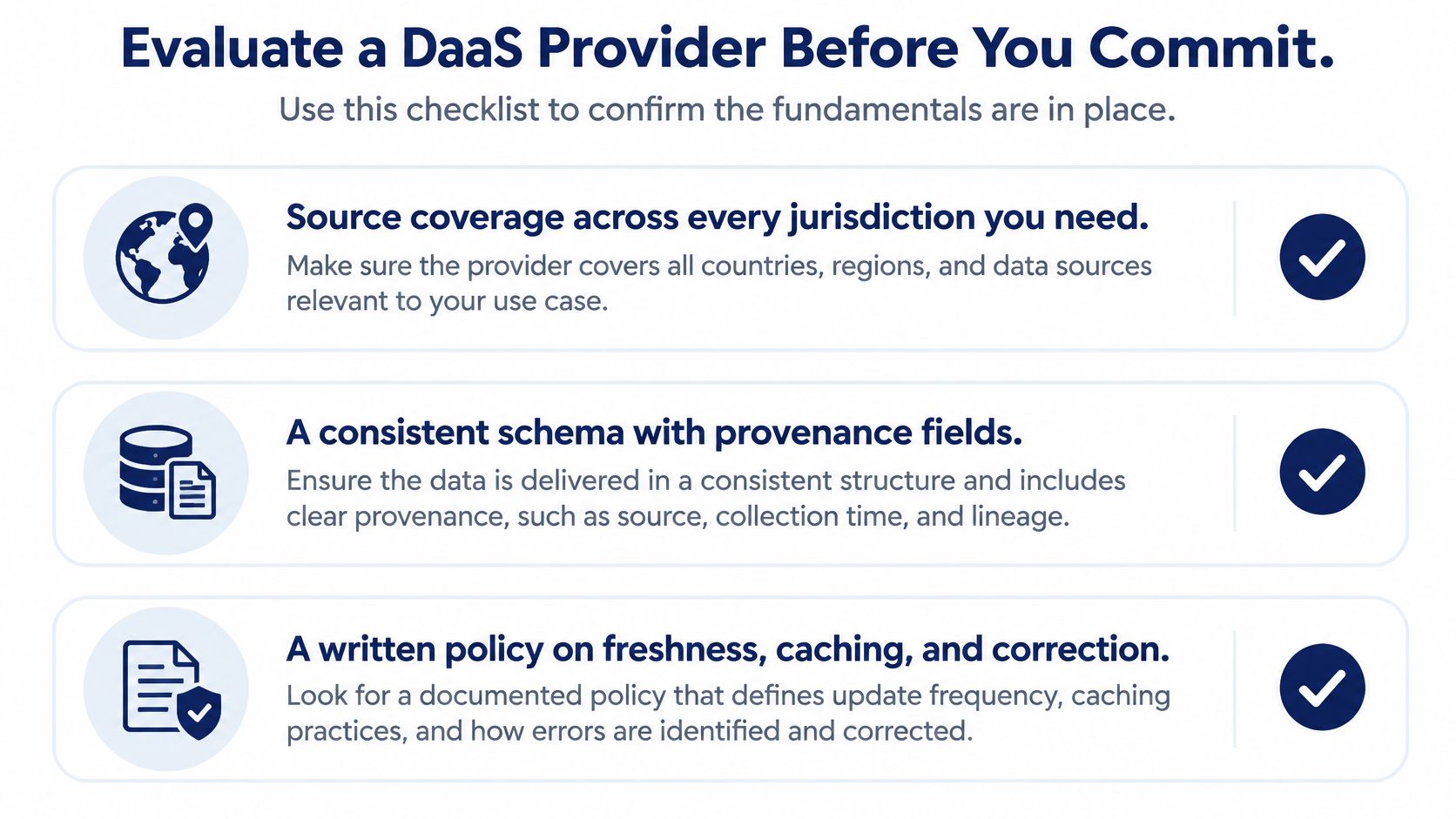
The checklist
- Source coverage: Every jurisdiction you need, confirmed state by state, not assumed from a coverage claim.
- Schema with provenance: A consistent schema that carries source identifiers, timestamps, and original values beside normalized ones.
- Written freshness policy: Caching, refresh, and correction of source errors stated in writing, including who can fix a wrong record.
- Consistent error responses: Documented error semantics your code can branch on, the same across all sources.
- Stated uptime commitment: Availability guaranteed only where the plan or contract says so. Without one, you have a hope, not a commitment.
- Written permitted-use and resale terms: What you may do with responses, and what you may not redistribute, spelled out before you build on them.
- Ownership statement: Confirmation that you keep your applications and the data you supply.
Read the remedy clauses too. SLA credits and billing relief for extended outages apply only where the provider states them. If uptime carries financial consequences for your product, that language belongs in your contract, not in a sales conversation.
Run your own records before you sign
Create an account, since accounts are required to use our service, and test with a sample of your own real records. Include known difficult cases on purpose, common names with multiple matches, recently changed entities, and records from states that publish thin data. Compare each returned field against the official registry and log every mismatch with its cause.
Start that test on the free tier. Consider Enterprise only if you need SSO, audit logs, or custom SLAs. Our Enterprise plan uses custom volume pricing and adds custom monitoring slots and frequencies, dedicated infrastructure, and a dedicated account manager on top of Scale. Buy that tier for governance requirements you have, not for volume you hope to reach.
If your team is maintaining registry scrapers or checking entity records by hand, you can replace that work with one endpoint that returns normalized records, with provenance, from all 50 states and DC. Start with a free account, run your hardest real records through the API, and compare the results against the official registries yourself. Visit SOSfinder to set up your test today.