MS LLC Search: Find and Read Records

You're about to pay a new vendor, sign a contractor, or approve an onboarding file, and the name in front of you is close to a Mississippi LLC but not quite exact. The W-9 says one thing, the invoice drops a word, and the person asking for payment swears it's the same company. That's the moment an MS LLC search earns its keep, not as a green light, but as a way to pin the claim to one registry record.
Scale is part of the problem. The Census small business story counted 30,427,808 nonemployer establishments in 2023, up from 29,811,495 in 2022, so searching only employer businesses misses most of the overall market. I treat every search as identity resolution first and approval second.
Search Keys and Fields on Every Hit
Say a counterparty tells you they're a Mississippi LLC, the name on their invoice is one word short, and accounting wants to release payment today. Don't start by trusting the invoice. Start with the Mississippi Secretary of State business search, the official registry. Tools that look like SOSfinder only mirror that record, so the state entry is the thing you're trying to match.
Pick the key that fits what you actually know
| Search key | Best first use | What it often misses |
|---|---|---|
| Legal name, Starting With | You know how the name begins | Entities whose legal name does not start with those words |
| Legal name, All Words | The words are known but the order is not | Unrelated LLCs that share common words |
| Business ID | A prior filing or invoice already shows the ID | Any search before that ID is known |
| Officer or manager name | Two similar entity names need a person to separate them | Other companies that list the same person |
| Registered agent name | You are tracing entities tied to one agent | Unrelated clients of a high-volume agent |
Starting With wins when you're confident about the opening words and want a tight list. It fails when the legal name begins with a word the trade name drops, like a holding word at the front. All Words is looser and catches reordered names, but common words such as services, group, or solutions drag in noise.
A Business ID is the cleanest key once you have it, because it points at one record instead of a family of similar names. If you're unsure what that identifier represents, read what an entity ID is before you treat it like a tax number. Officer and agent searches aren't primary keys. They're tiebreakers.
Read the whole row before you choose
Don't click the first plausible name and move on. On every returned row, read these fields together:
- Legal name and name type: Confirm you're looking at the legal name, not a former or alternate name.
- Business type: Check that it's an LLC, not a corporation with a similar name.
- Business ID and current status: Capture both, they're your later lookup key and first risk flag.
- Effective date: Use it to separate a long-standing entity from a recent namesake.
- State of incorporation and principal office address: Foreign entities registered in Mississippi will look different from domestic ones, and the address either matches your paperwork or it doesn't.
An empty exact-name result isn't proof a name is available. It's proof that one query, run one way, returned nothing.
That's the closing rule for this stage. Starting With and All Words can surface a near match your exact query missed, and a trademark or assumed name can block you even when the registry looks clear. Zero hits is a prompt to search differently, not a filing decision.
How to Run the Registry Lookup
A vendor emails "Magnolia Site-Work, LLC" and wants a payment the same afternoon. Run the Mississippi lookup as one staged pass and save the work as you go. The Mississippi registry guidance on SecretaryOfState.org supports querying by "Starting With" and "All Words", then by Business ID, officer, and registered agent. That menu is why a single exact-name try is too weak.
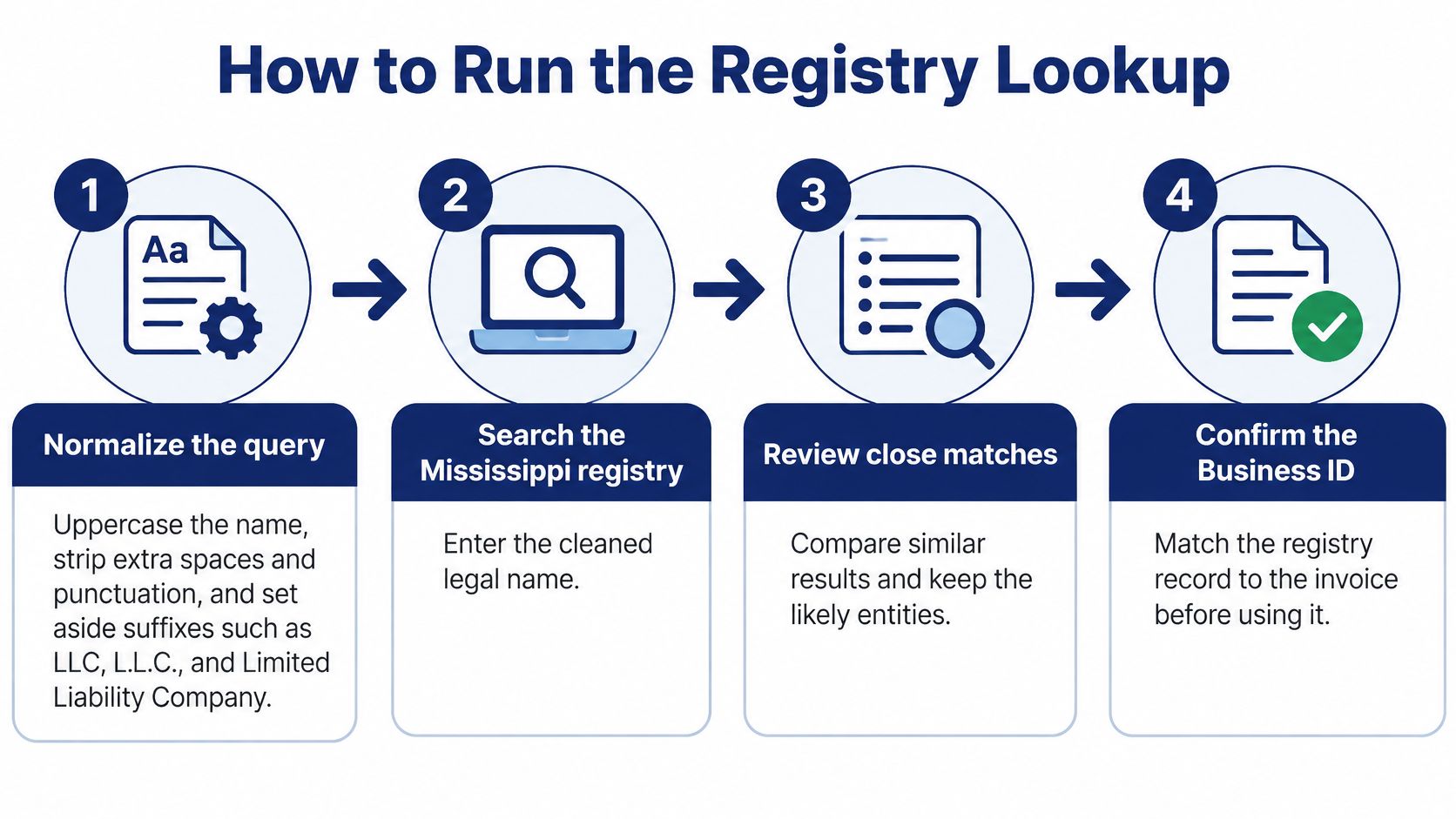
The seven steps in order
Normalize the query. Uppercase the name, strip extra spaces and punctuation, and set suffixes like LLC, L.L.C., and Limited Liability Company aside for matching. Keep the original string exactly as the counterparty gave it, so the file shows what you searched. Skip this and "Magnolia Site-Work, LLC" and "Magnolia Site Work LLC" land in the file as two companies.
Search Starting With, then All Words. Run the cleaned name both ways and keep every candidate, not the first row. Starting With favors names that open the same way. All Words catches the same words in a different order.
Record the fields on each candidate. For every row, write down legal name, name type, business type, Business ID, status, effective date, state of incorporation, and principal office. Capture only the name you liked and you lose the contrast that separated it from the names you rejected.
Switch to the Business ID. Once one row is clearly closest, rerun by that Business ID and use the ID on every later check. Amendments change names. The ID is the stable handle, so a renewal review stays on the same filing.
Break ties with people and addresses. If two names are still too close, search the officer or manager, then the registered agent. Keep a record only when it also matches an address or ID you already hold from your own paperwork. A shared agent alone proves almost nothing. One agent can sit on hundreds of unrelated filings.
Timestamp and store the response. Save the date and time, the query string, and the candidates you kept. Rerun immediately before a filing, a payment, or an onboarding approval. A week-old screenshot is a historical note, not a current check.
Set a confidence cutoff and send the rest to a person. Exact name, matching address, and matching ID is a confident match. A near name with no second detail goes to review. Do not let the workflow treat the closest row as identified.
What this process does not settle
A hit means the name is present in the registry. It does not show who may sign, whether the LLC is in good standing, or which filing documents exist. Status on the row is a flag you record, not a decision you act on. Picking the wrong entity can enable fraudulent filings and lawsuits, so grabbing the first similar name is the shortcut to avoid.
Practical rule: If you can't name the Business ID, you haven't identified the entity yet.
Finish with one of two artifacts. Either you have one Business ID tied to a detail you already held, or you have a written reason the match failed: two surviving candidates, or no candidate that matches the address. "We searched and it looked fine" is not a result the next reviewer can audit.
What an Active Status Actually Proves
An active flag doesn't mean legitimate, and treating it that way is the most common mistake I see teams bake into onboarding. The Mississippi Secretary of State business FAQ keeps annual reports, amendments, dissolved entities, registered-agent changes, certificates of good standing, and certified copies as separate workflows, which tells you they're separate evidence. One screen doesn't do all that work.
A searchable record is registry presence, not proof of operations, solvency, or authority to sign.
Four evidence levels that are not interchangeable
| Outcome | What you hold | Does not prove | Get next |
|---|---|---|---|
| Entity found | Name, Business ID, type, address | Active operations or solvency | Status and effective date |
| Status shown active | Current registry status flag | Continuous good standing or fresh contacts | Annual-report and agent history |
| Good standing | Certificate of good standing | Who owns or controls the LLC | Certified copy if authority is disputed |
| Filing documents | Reports, amendments, certified copies | Beneficial ownership or sanctions clearance | Customer ownership evidence |
| Dissolved or past due | Dissolution or missed-report risk | That the company never existed | Filing history before any payment |
Entity found means the name sits in the registry with a Business ID. That's existence on paper. It doesn't say the company trades, has money, employs anyone, or is owned by the person emailing you for a wire.
Status shown as active is stronger, but it's a current flag, not a narrative. Annual reports arrive pre-populated from existing registry data and the filer has to update and submit them, so the address, agent, or managers on screen can be stale even while the entity stays searchable. You're reading what was last filed, not what's true today.
Current good standing is a certificate you order for the purpose. If you want the distinction spelled out, see what being in good standing means and stop using the search view as a substitute. Authoritative filing evidence sits above that again, in the annual report, amendment, agent change, or certified copy itself.
Match the evidence to the decision
A timestamped search result is enough for an internal note that says, we found this Business ID on this date. It isn't enough for a loan, a large first payment, or a contract where authority to sign matters. For those, get the certificate, and when a dispute turns on the document itself, order the certified copy instead of arguing from screenshots.
Ownership is a separate wall entirely. Under the current federal regime for domestic companies, a missing beneficial ownership filing isn't automatically a red flag for a domestic Mississippi LLC, and the officers or managers shown on the state record aren't beneficial owners with ownership percentages attached. If your workflow needs ownership, collect it as its own evidence stream and don't pretend the registry handed it to you.
Ask the precise question your decision depends on. Existence, status, standing, filings, and ownership each answer a different one. When a team asks whether an LLC is "legitimate," they usually mean one of those five, and the search only covers the first two well.
Annual Report Timing and Dissolution Risk
Mississippi gives you two dates to build around. The Secretary of State annual reports page states that for-profit corporations and LLCs must file annual reports online, with reports available from January 1 and due April 15 each year, and that failure to file may result in administrative dissolution. Everything useful in monitoring hangs off that window.
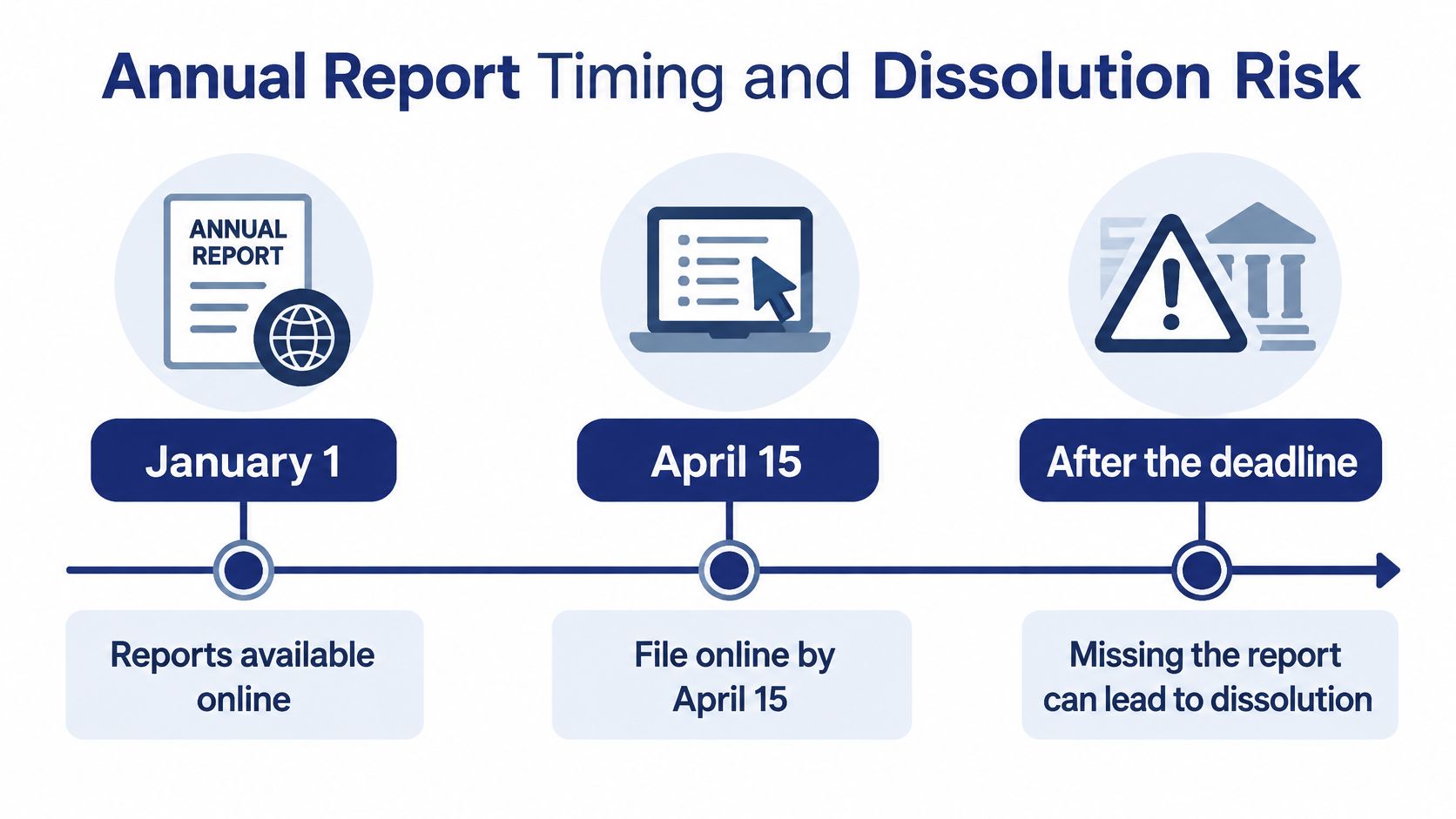
What to pull after the name match
Don't stop at the status banner. Retrieve the record's current status, Business ID, effective or formation date, principal address, registered agent, and filing history, then label the file plainly:
- Active: Status is active and the expected annual report is on file.
- Delinquent: A report looks missing or late relative to the deadline, so dissolution risk is live.
- Dissolved: The registry shows dissolution, and payment or contracting needs to stop pending review.
- Needs a person: Fields conflict, something changed very recently, or the history doesn't explain the current flag.
Use the Business ID as the stable key for every repeat pull, because the legal name can change and name searches can return multiple candidates. Store the observed status with its retrieval timestamp each time. On the next snapshot, compare status, agent, address, and whether a new annual report has appeared.
Three moments worth scheduling
Check in early March, while a vendor who hasn't filed yet still has time to fix it before the deadline. Check again in the week after April 15, when a missing report stops being procrastination and becomes real dissolution exposure. Check a third time at the decision itself, whether that's onboarding, renewal, lending, or a vendor payment, because a clean March record can degrade by June.
Today's active flag doesn't prove continuous good standing. An entity can look fine on the banner while its history shows gaps, late filings, or a recent reinstatement you should understand before relying on it. Read the sequence of filings, not the headline.
A status is a snapshot. The filing history is the story, and the story is where dissolution risk hides.
For a portfolio, keep the registry PDF reference when the site offers one, so an auditor can reach the underlying document later. Route ambiguous, newly changed, or dissolved records to a compliance analyst instead of auto-approving them. Automation is good at flagging change and bad at judging whether a change is innocent.
Two habits save rework. Search both name variants before concluding an LLC is gone, since a name change can make an entity look vanished. And don't treat a dissolved entity's name as freely available for a new filing without checking revival rights and name conflicts first.
Workflow and API Lookup Examples
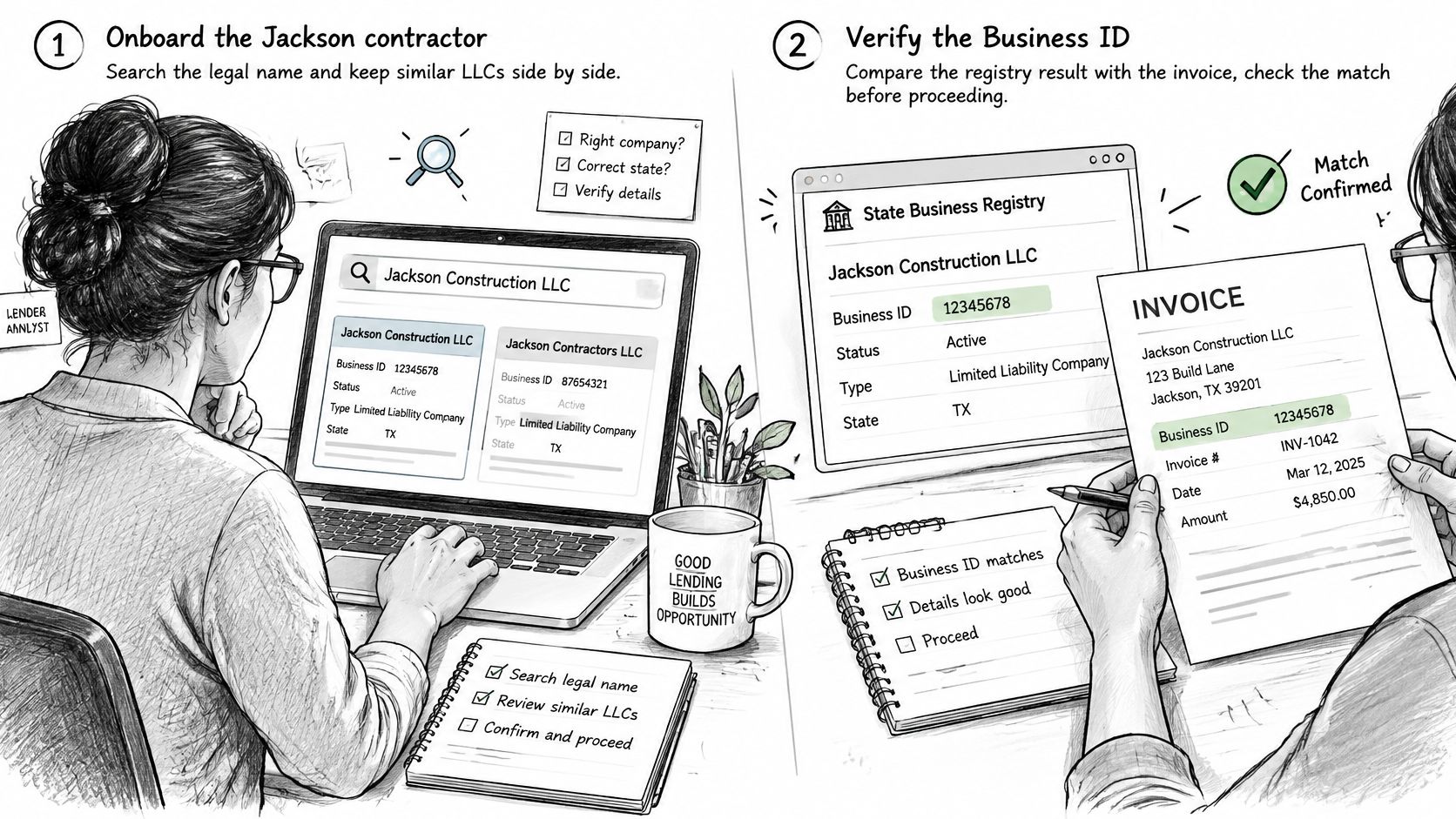
Say a lender is onboarding a Jackson contractor and the first draw is waiting on verification. The analyst searches the legal name and gets two similar LLCs, one older and active, one recent with a nearly identical name. Instead of picking the older one on instinct, they compare the Business ID against the number printed on the contractor's invoice, confirm the principal address matches the yard address on the application, and check the latest annual report.
Only then does the file move. Because the draw exceeds the lender's internal threshold, the analyst requests a certificate of good standing before funding. The registry search did the identity work. The certificate carries the funding decision.
The same check as a product flow
Now put that analyst's judgment into software. Normalize the submitted name, call the registry search with state set to MS, and score exact, token, prefix, and fuzzy matches separately rather than collapsing them into one number. Return candidates for review instead of a boolean "available," because a boolean hides the near match that matters most.
Store the raw response with a timestamp alongside your normalized fields. The fields worth mapping are consistent: status, entity type, formation or registration date, registered agent, principal address, and filing history with PDF links when the state offers them. If you want a concrete request shape, the walkthrough in this API integration example follows that same state-plus-name pattern.
Build two safety valves in from the start:
- Retries on blocked requests: Registries throttle and block, so retry with backoff and surface a clear pending state instead of recording a false no-match.
- A human queue: Send anything to a reviewer when the best score falls under your cutoff, two candidates score closely, or the status reads dissolved.
Ownership is a second layer, not a search result
Don't let the API blur this line. FinCEN's news release on its interim final rule says the March 21, 2025 rule removed BOI-reporting requirements for U.S.-created companies and U.S. persons while retaining obligations for certain foreign entities registered to do business in the United States. So "no BOI filing found" isn't a red flag by itself for a domestic Mississippi LLC.
The state search verifies legal existence, status, identifiers, agent, and filings. Ownership percentages, control, and sanctions screening come from customer documents and your risk rules. Keep those streams separate in the data model, or an auditor will later mistake a registered agent for an owner.
For ongoing files, use webhooks or scheduled rechecks to catch status, agent, and address changes, and weight the schedule around Mississippi's annual filing cycle. A single-state screen is fine for one LLC you'll check twice a year. An API pays off when the same check runs across a portfolio and nobody can hand-search every record before the deadline.
Confirm the Match Before You Act
Before you file, fund, or pay, run these five checks against the record in front of you. They take a minute and they catch the errors that cost real money:
- Business ID: It matches the ID on the document in your hand, not just a similar name.
- Status: It reads active, not dissolved or delinquent.
- Annual report: The latest report is on file relative to the April 15 due date.
- Agent and address: The registered agent and principal address still match the contract you're signing.
- Near match sign-off: A person has reviewed and approved it if the name was only close.
Act on a miss, don't rationalize it. Stop the payment, ask for a certificate of good standing, or order the certified filing instead of trusting the search screen. If the lookup came back empty, the troubleshooting steps in what to do when no match is found are the right next move before you conclude anything.
If you'll run this repeatedly, we built SOSfinder as an independent API over official registries, not as a Secretary of State site. You authenticate with a server-side secret key and call GET /search with the state and business name, and you can look a record up directly by a state's registry ID field once that field is known. SOSfinder is not affiliated with, endorsed by, or acting on behalf of any Secretary of State, state agency, or other government body.
Automation doesn't remove the judgment. Close names still need human review, and ownership still sits outside the registry. Rerun the search the day you file or release funds, and keep the timestamped response filed with the decision it supported.
Run your first MS LLC Search through SOSfinder and get the best match plus similar filings, with status, registered agent, formation date, and addresses in one consistent record. Pin the Business ID, keep the timestamped response with your file, and set a monitor so status, agent, and address changes reach you before your next payment or renewal depends on them.