Registered Agent Lookup Texas: Find and Verify Any Entity

You have a signed vendor agreement, a loan packet, or a looming contract dispute sitting on your desk, and you need to confirm who can legally accept papers for a Texas company. Many people run a quick registered agent lookup in Texas, copy the first name that appears on screen, and move on to the next task. That shortcut creates expensive legal and compliance surprises.
A registered agent listing isn't a permanent trait on a company's profile. It's a time-sensitive filing field that can look accurate on a state summary screen and still fail the moment a process server walks up to the door. As of January 1, 2025, Texas had 2,928,688 actively registered business entities, according to a Texas Secretary of State news release. Navigating a registry of nearly three million businesses takes more than finding a matching name; you need a repeatable way to verify that the record is current, complete, and serviceable.
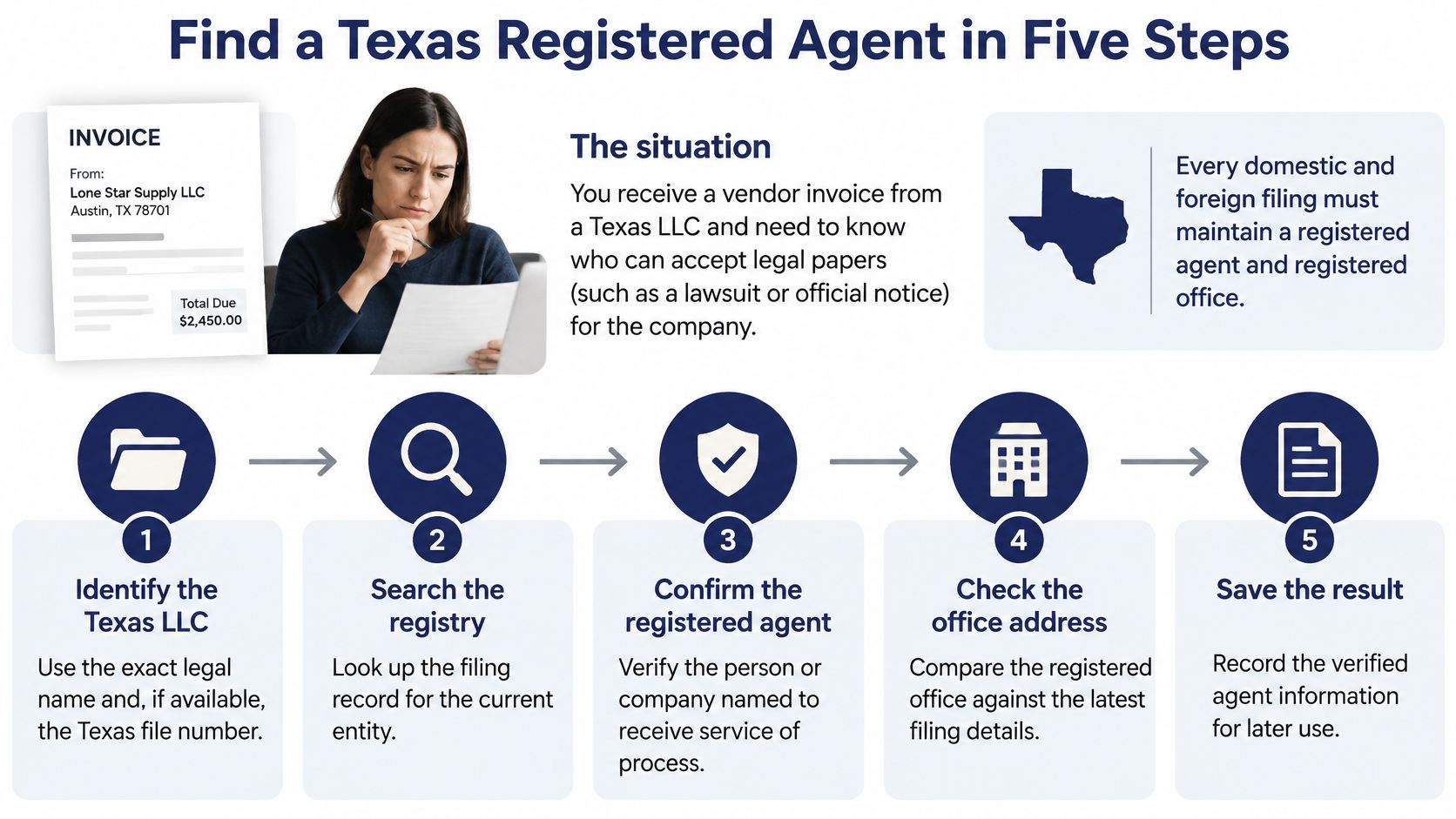
Find a Texas Registered Agent in Five Steps
Say a vendor invoice arrives from a Texas LLC your company has never paid before, and your legal or procurement team needs to confirm who can accept official notices or legal papers on the business's behalf. Before you approve the vendor or send formal correspondence, you have to pull the company's current agent from the state registry.
Under the Texas Secretary of State registered agent FAQs, Texas requires every domestic filing entity and every foreign filing entity registered to conduct business in the state to continuously maintain both a registered agent and a registered office address in Texas. The agent's core legal role is to receive or accept service of process, notices, and demands, then forward them to the company or notify it at the latest address the entity supplied. Either an individual Texas resident or an organization authorized to do business in Texas can serve, though the represented company can't act as its own registered agent. Failing to maintain both continuously can trigger involuntary termination for a domestic entity or revocation of a foreign entity's Texas registration.
The visual workflow below outlines the five-step sequence for pulling a clean Texas registered agent record from scratch.
Five Steps for a Reliable Registry Pull
Follow this sequence every time you look up a Texas counterparty so you don't pull the wrong legal entity or rely on an outdated filing.
- Start with the exact legal name and file number. Pull the company's full legal name directly from its W-9, contract, or invoice, including suffixes such as LLC or Inc., along with its Texas file number if you have it. Starting with exact identifiers filters out affiliates and similarly named businesses right away.
- Search the Texas business records and list every close match. Query the Texas Secretary of State business records or run a Texas LLC name search, and log every similar entity name before opening a single profile. Common business words frequently return several distinct legal entities, so clicking the first result often attaches your file to the wrong company.
- Open the matching record and copy three core fields verbatim. Record the registered agent name, the registered office street address, and the entity status exactly as the registry displays them. Copying the exact text without reformatting preserves clean evidence if a counterparty later disputes your records.
- Inspect the filing history for the newest agent or office change. Look past the original formation entry to check whether a newer statement of change or amendment replaced the agent or street address. The most recent processed filing governs, even if the vendor handed you an older certificate of formation.
- Save the record with the exact pull date. Archive the screen capture or downloaded summary alongside the date you ran the search. A dated copy proves what the state registry displayed at the moment you cleared the vendor or prepared legal notice.
Pay close attention to the address format before closing the browser tab. Texas requires the registered office to be a physical street address where the agent can be personally served during normal business hours, and a post-office box alone doesn't satisfy the requirement.
Compliance warning: A blank registered agent field or a post-office box listed by itself as the registered office signals that the entity may already be out of compliance with Texas law.
Record Fields That Show Whether Data Is Current
The most common operational mistake in corporate due diligence is treating a Texas registered agent lookup as a permanent static fact rather than a live filing field. According to Texas Secretary of State taxable entity search guidance, companies must file changes to registered agent or registered office details with the Secretary of State through an amendment or a statement of change. Because those filings happen at any point in a company's lifecycle, a snapshot you saved months ago can lose accuracy.
Use the table below to evaluate the five core fields on a Texas entity record and spot the values that require immediate escalation.
| Record field | What it tells you | Red flag |
|---|---|---|
| Entity status | Whether the entity is active and allowed to operate | Forfeited, inactive or terminated status |
| Registered agent name | The person or company the state has on file to receive legal papers | Blank, or a name that differs from the latest filing |
| Registered office address | Physical Texas street address where the agent can be served in business hours | Post-office box only, or an address outside Texas |
| Latest filing date | Date of the most recent amendment or change of agent | Newer than your saved copy, so re-pull the record |
| Entity type and formation date | Confirms you matched the right legal entity | Type or date that does not match the customer's documents |
Reading Each Field Against Your File
Start with entity status as your baseline check. Active status indicates the company currently retains authority to transact business in Texas, while forfeited, inactive, or terminated entries warn you that the entity may have lost its operating rights. If a status code looks unfamiliar, walk through how to check if an LLC is active before approving credit or signing an agreement.
Evaluate registered agent name and registered office address together under a strict minimum acceptance test. For onboarding, confirm an exact entity-identifier match, verify that the named agent qualifies as an individual Texas resident or an organization authorized in Texas, and verify that the office is a physical Texas street address. Never infer registered agent authority from a principal business address, a commercial mailing drop, an officer's name, or an old annual-report extract.
Latest filing date, entity type, and formation date catch the subtle version errors that pass casual inspection. Say a commercial lender pulls a borrower's profile and sees active status, so the underwriter prepares to close, even though the borrower swapped registered agents three months ago and the loan packet still contains an older formation certificate naming the previous agent. Comparing the newest state filing date against the paperwork in hand surfaces that drift immediately.
Don't expect to find the agent's signed consent form attached to the public entity view. Texas instructions require agent consent, yet state that a copy doesn't need to be submitted with the certificate of formation, meaning the public record confirms the state's designated agent without independently proving that a privately held consent form exists. In your review sheet, mark each of the five fields as pass, review, or fail, and re-pull the live record whenever the state's latest filing date is newer than your saved copy.
Confirm the Agent Can Be Served Before You Rely on It
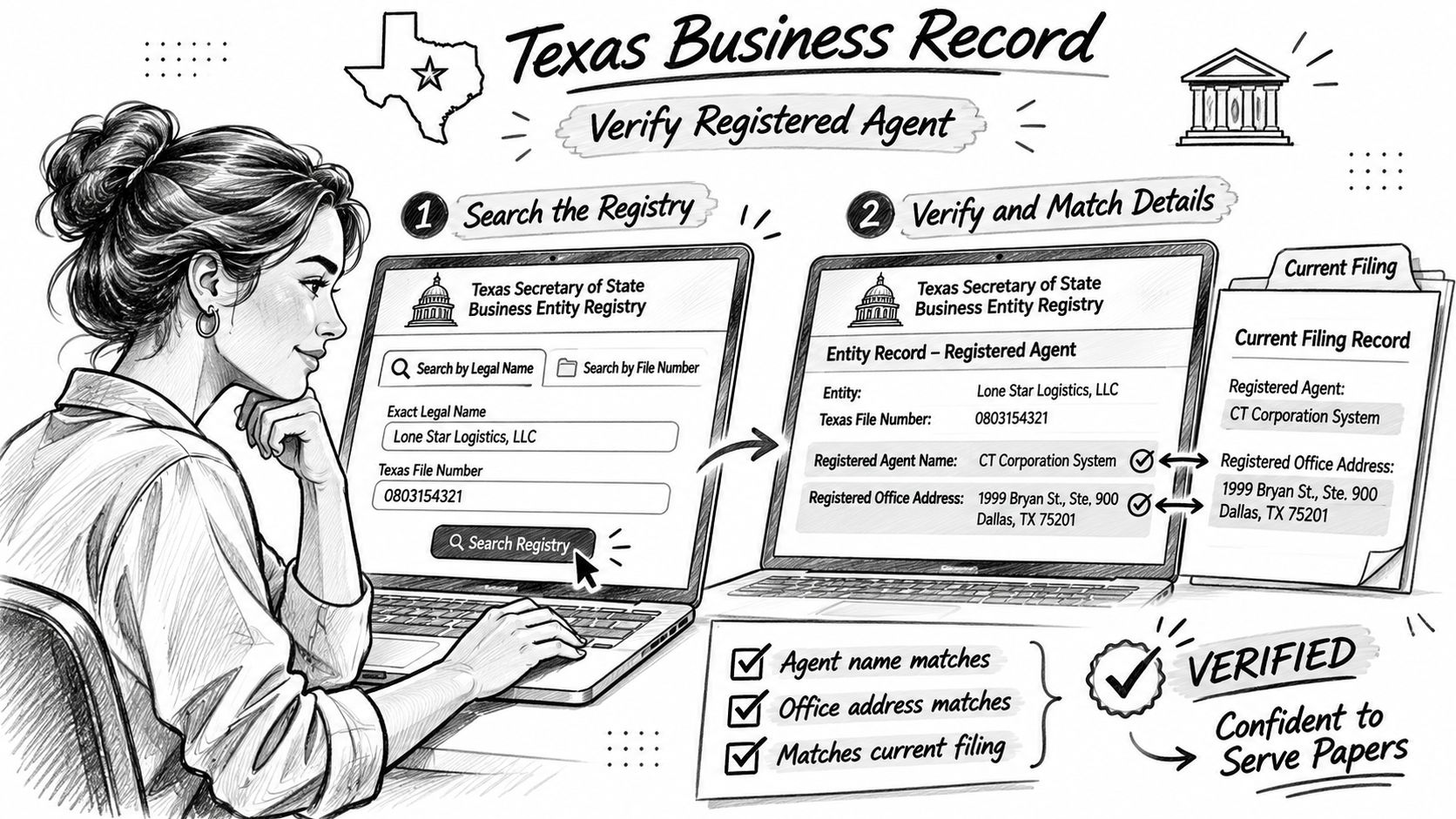
A defensible verification workflow starts with two practical moves. First, isolate the legal entity using its exact legal name, Texas file number, or registry identifier. Second, validate the returned agent name and street address against the company's latest formation, amendment, or change-of-agent filing instead of trusting an unverified summary screen. Before relying on a Texas record for underwriting or legal service, confirm that the underlying filing details match reality on the ground.
Three Questions the Public Record Cannot Answer Alone
Copying a name from the registry does not finish the job. Separate three questions a single screen cannot answer: who is currently recorded by the state, whether that person or company consented to serve, and whether the listed office address is serviceable today.
Under Chapter 5 of the Texas Business Organizations Code, every domestic and foreign filing entity must maintain a consenting agent and registered office. The Texas Secretary of State does not maintain a list of companies or individuals offering registered agent services. Written or electronic consent is required for any designated agent. When an agent elects to file a formal consent statement with the state, the Texas Secretary of State Form 401-A instructions list a $15 fee in 2025, reduced to $5 for nonprofit corporations and cooperative associations. Because filing that consent is not required with formation documents, a name appearing in the registry does not prove the agent is still willing or operational.
A process server can visit a listed Dallas office suite for an LLC showing active status and still find that the listed individual no longer works with the company and refuses delivery. Service fails on the spot, even though the public database looked clean. When the financial or legal stakes are high, call the listed agent before sending papers. Confirm two things directly: that they currently represent the entity and that they accept service of process at that exact street address.
Official registry data establishes who the state has recorded on paper, not whether someone is physically available at that desk to accept legal process today.
What Changing a Registered Agent Does and Does Not Hide
Founders and compliance teams also stumble over privacy assumptions tied to registered agent records. Consumer articles often frame hiring a commercial registered agent as a catch-all way to keep a founder's home address out of public view. That framing glosses over how Texas public records store identity data.
The Texas Secretary of State entity search portal is the starting point for finding a record by entity details, then opening the filings that sit behind the summary. Swapping out a registered agent updates the service-of-process designation going forward. It does not strip personal information already sitting inside original formation documents, management filings, historical copies, or related public records.
Read an entity profile as separate record layers during KYC reviews or vendor diligence: the registered office address, the principal business address, the mailing address, organizer or management details, and historical filing copies. Knowing what a registered agent address actually covers prevents risk analysts from mistaking a commercial agent's shared office suite for a borrower's real operating facility. It also helps remote founders understand that changing an agent is not a data-erasure tool.
Watch the video below for a concise look at how Texas registered agent designations fit into a company's broader public filing profile.
Building an Exception Queue and Audit Trail
Manual reviews and automated KYC pipelines both need an exception queue. Halt auto-approval whenever these red flags appear:
- Missing file numbers: Records matched on name alone without a verified Texas file number carry a high risk of pointing to an unrelated entity.
- Multiple similar-name entities: Clusters of overlapping company names require checking entity types, formation dates, and management filings before locking in a match.
- Inactive or forfeited statuses: Any status short of active requires verifying whether the entity lost its authority to transact business in Texas.
- PO boxes or non-Texas addresses: Mailing drops and out-of-state street addresses fail Texas personal service requirements and need immediate clarification.
- Newer agent change filings: Any change-of-agent document dated after the certificate in your file overrides the older paperwork and demands a fresh pull.
Finish every verification by saving a clean six-field audit record: the entity identifier, entity status, registered agent name, registered office address, source filing date, and retrieval timestamp. Normalize punctuation, casing, and street abbreviations strictly inside your matching software. Preserve the raw registry text untouched so your audit trail holds up under scrutiny.
Special Cases Where Lookups Mislead
Most inaccurate lookup decisions stem from a small group of recurring situations rather than simple spelling errors. As of February 2025, Texas had 2,964,180 active business entities, an increase of 35,492 entities since the start of 2025 according to a Texas Secretary of State February 2025 news release. That constant flow of new formations, name overlaps, and mid-year updates makes edge cases routine work. An agent name that was correct when you first copied it can go stale within months, so every trap below is really a question of currency: is the field still accurate, and can someone be served at it today.
The comparison table below pairs the five most common lookup traps with what the registry displays and how to resolve each one.
| Situation | What the record shows | What to do |
|---|---|---|
| Entity formed before January 1, 2010 | Record may reflect the framework before the Business Organizations Code | Pull all amendments and changes filed after formation |
| Foreign entity registered in Texas | Agent and office are required, and registration can be revoked | Confirm the Texas registration is active before relying on it |
| Recent change of agent | Newer filing overrides the agent named in the formation document | Use the latest filing date and note the change date |
| Office listed as a post-office box | Does not meet the physical street address requirement | Request a physical Texas street address before serving papers |
| Several entities share a name | Similar names may have different file numbers and agents | Match on the Texas file number before recording the agent |
Pre-2010 Filings, Foreign Entities, and Name Collisions
Entity age changes how you read Texas public records. January 1, 2010 was a major statutory milestone: according to the Texas Business Organizations Code overview, that's the date the Texas Business Organizations Code became mandatory for domestic corporations, partnerships, LLCs, other domestic filing entities, and foreign filing entities registered to transact business in the state. Under that framework, a person or company appointed as registered agent must consent to the appointment, and that consent does not have to appear in the public filing itself, so the absence of a signed consent on the public record proves nothing. Form 401 serves as the filing vehicle for changing a registered agent or registered office, which means the agent named in an old formation document is only valid until the next Form 401 hits the registry.
Because records created before that 2010 cutoff may reflect earlier statutory structures, original formation filings for older companies rarely tell the full story. Pull every amendment, Form 401 submission, and address update filed after formation so you separate legacy paperwork from current authority. The newest filing wins. Apply the same caution to foreign entities formed in another state and qualified in Texas: verify that their Texas registration remains active, because losing a valid agent or office exposes a foreign company to revocation in Texas regardless of its standing back home. A revoked registration means the agent on file may no longer accept service at all.
Name collisions and blank search screens are the other big trap. When several businesses share nearly identical names, only the Texas file number cleanly separates them, and a registry ID lookup returns exactly one record rather than a list of near-matches. On the flip side, if your search returns zero results, don't immediately assume the company is unregistered or fraudulent. Retry the query with the file number, test variant suffixes such as Inc., Corp., or LLC, and search under former legal names; if it still comes up blank, check the troubleshooting guide for when no business entity match is found to rule out punctuation differences and assumed-name filings.
Rule of thumb: Whenever a company's age, home jurisdiction, or naming history leaves room for doubt, pull the full filing history before relying on the registered agent field.
Decide Whether the Lookup Is Enough
A registered agent lookup in Texas needs a clear boundary between what works for screening and what holds up under legal pressure. If every field on the record passes your check, no red flags appear, and the latest filing date is newer than your last saved copy, a registry lookup is enough for preliminary vendor screening, intake triage, or a routine file check.
High-stakes decisions demand official state documentation. Whenever a loan disbursement, acquisition closing, regulated onboarding approval, or statutory service of process depends on the company's legal standing, order an official certificate of good standing or a certified copy directly from the Texas Secretary of State. A standard lookup screen is not a substitute for either document, and skipping official certification to save a small fee is a poor trade-off when real money or litigation deadlines are on the line.
Turning One-Off Checks Into Ongoing Monitoring
Even a spotless lookup expires the moment a counterparty files a statement of change or falls into forfeiture. For vendors, borrowers, or partners you rely on over time, move from one-time checks to a repeatable monitoring workflow: capture a verified baseline record, re-query the official source periodically, compare the registered agent name, registered office address, entity status, and latest filing date against your baseline, and trigger manual review whenever any field shifts.
Teams managing large counterparty portfolios often automate those comparisons instead of clicking through state portals by hand. SOSfinder provides one REST endpoint that looks up any business registered in all 50 states and DC, returning status, registered agent, formation date, and filings. Keep the legal distinction clear no matter which tool you pick: SOSfinder is an independent commercial service and is not affiliated with, endorsed by, or acting on behalf of any Secretary of State, state agency, or other government body. SOSfinder does not warrant that results are accurate, complete, or current, and the Service is not a substitute for an official certificate of good standing or a certified copy.
Put this process to work before a dispute or audit tests your files. Run the five-step Texas lookup on the three counterparties that matter most to your business this month, log each entity's status, registered agent, physical street address, and latest filing date with today's date, and flag any record that fails a field check for direct phone verification or an official state certificate.
If your team handles recurring vendor due diligence, onboarding, or KYC checks across Texas and beyond, we built SOSfinder to pull normalized entity status, registered agent, formation date, and filing history data from all 50 states and DC through one REST endpoint. Our Free plan includes 50 lookups a month with no credit card required, and you can set up monitoring alerts whenever a tracked company changes status, registered agent, or address. Visit our site to run a live Texas lookup and see how structured registry data fits into your verification workflow.