Interstate Cleaning Corporation Registry Lookup Guide
What does an "Active" status prove?
On its own, almost nothing. A state registry returns a ranked best match for a name, and a record marked active tells you that some entity with roughly that name is in good standing somewhere. It doesn't tell you that the entity is Interstate Cleaning Corporation, the Missouri corporation tied to a mid-1980s formation, or a differently organized company that happens to share three common words.
The fix is to build the expected record before you search, then treat it as a test rather than a suggestion. That's the discipline this walkthrough teaches, one lookup at a time.
Expected Registry Profile for Interstate Cleaning Corporation
A clean lookup starts with the reference sheet you assemble before typing anything into a registry.
The company's published corporate history places its origins in St. Louis, Missouri, with incorporation recorded on August 3, 1984, and states that the firm has provided janitorial and maintenance services since that year. The same profile records the Better Business Bureau's January 1, 1985 business-start date and the April 17, 2003 date its BBB file was opened, identifies the organization as a corporation, and gives its principal St. Louis address as 1566 N. Warson Road.
Two things follow. The company has traded for roughly four decades, which fixes the formation date you're testing against. And the business-start date is not the formation date. Plenty of profiles substitute one for the other, which makes a correct record look wrong.
| Registry field | What it should show | Reference value |
|---|---|---|
| Legal name | Exact name on file | Interstate Cleaning Corporation |
| Entity type | Type of organization | Corporation (BBB listing) |
| Formation date | Date the state recorded the incorporation | August 3, 1984 (company history) |
| State of formation | State where the entity was organized | Missouri, from the St. Louis origin; confirm in the registry |
| Status | Active, good standing or another state status | The state's own wording in the record, whether active, good standing, or whatever label that office uses |
| Registered agent | Agent name and address on file | The individual or agent service named in the most recent filing, at a Missouri address |
| Principal address | Office address on file | 1566 N. Warson Road, St. Louis (BBB listing) |
| Filings | Annual reports and amendments | A current annual report on file, plus any amendment that changed the agent or address |
Reference first, lookup second: four cells above are settled by company or BBB sources, and three can only be settled by the state. Mixing the two turns a guess into a conclusion.
Status, registered agent and filings are the cells that must come from the registry itself. If the formation date reads August 3, 1984, the state of formation reads Missouri, and the principal address matches the St. Louis office, you've identified the right entity. If the formation date or state differs, you're looking at a different company with a similar name, no matter how confident the ranking looks.
How to Run an Entity Lookup by Name
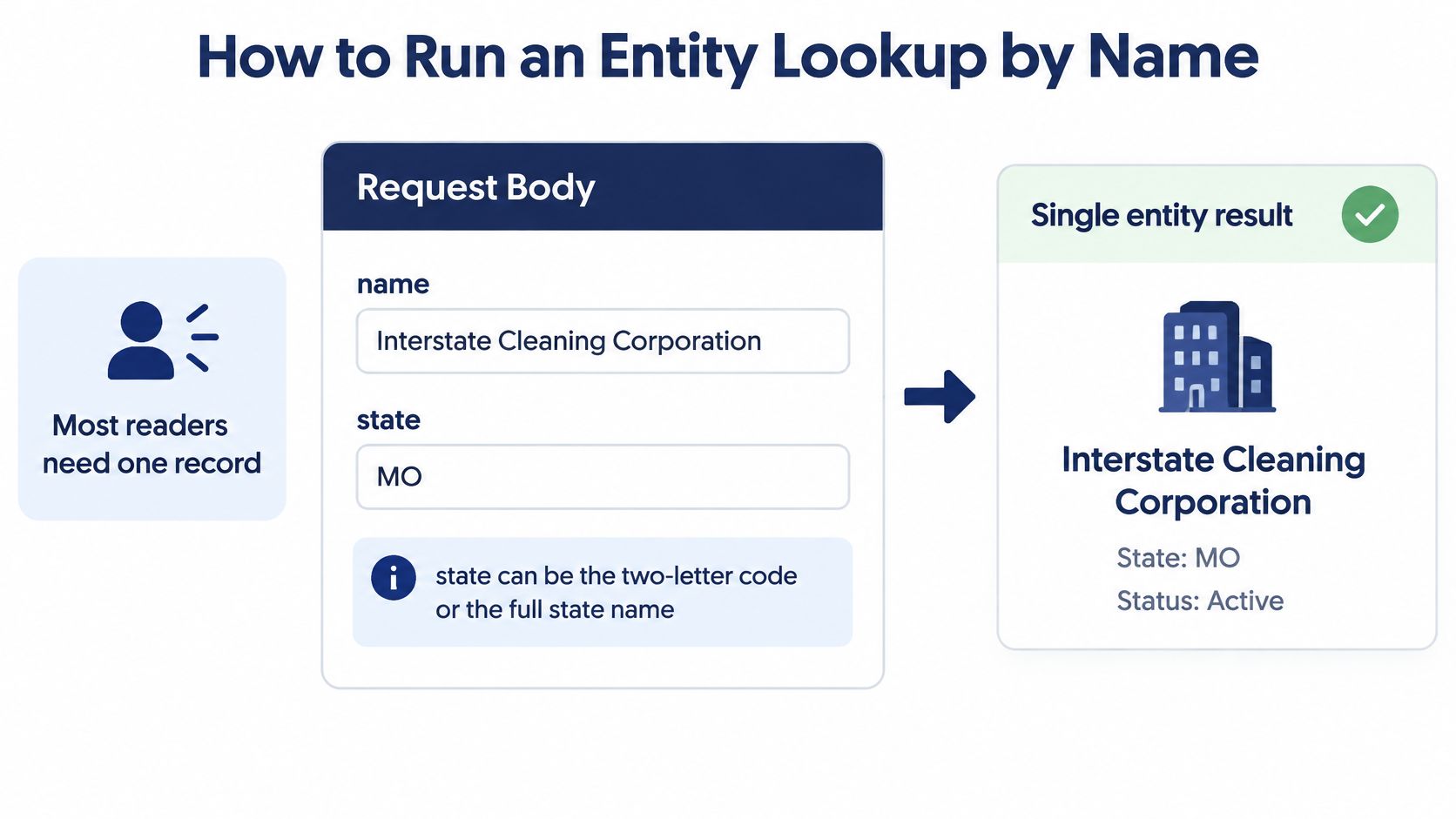
Most readers need exactly one record, so start with the name search and treat everything else as a fallback.
Send the query as a body with two fields.
Request
- name: Interstate Cleaning Corporation
- state: MO
The response returns the best match first, with similar filings listed alongside it.
Response (illustrative)
- status: Active (illustrative)
- entityType: Corporation
- formationDate: 1984-08-03
- registeredAgent: the name and address on file in the current filing
- officers: the officers recorded in that filing
- principalAddress: the office address on file
Here's the sequence that avoids the usual mistakes.
- Write the legal name exactly as filed, including the word Corporation. Dropping the suffix or inserting an ampersand changes what the index matches.
- Set the state to the state of formation, which is Missouri (MO) for this company. Don't infer it from where an office sits, because an office and an incorporation state are different facts.
- Send one request to the single REST endpoint and read the JSON that comes back.
- Read the best-match record in full: status, entity type, formation date, registered agent, officers and principal address.
- Scan the similar filings returned beside it. Note any that carry the same name but a different formation date or state, because those are your exclusion candidates.
- Save the record with the retrieval date. Status changes, and a printout without a date can't be defended six months later.
Reading the returned fields
Status is the state's own label for standing, so quote it rather than translating it into "active" if the office uses different words. Entity type distinguishes a corporation from an LLC or a partnership, which matters when you're checking signing authority. Formation date is the field that does the most work in identification, since it's very hard for a similar name to match it by accident. Registered agent is the party designated to receive legal notices at a physical address in that state. Officers are the people the filing names, and principal address is the office the company reports.
A complete result looks like this: one best match with the expected formation date and state, a current status in the state's wording, and a named registered agent with a street address.
The state is a parameter, not a guess. Missouri is where the history says the company was organized, but that's not yet a registry fact. If no Missouri record appears, repeat the name search across other states before concluding that no record exists.
You can pass the state as a two-letter code or as a full name, so WY and wyoming both work.
Direct Lookup by State Registry ID
A name search is a filter. An ID lookup is a key. Reach for the key when several records share the name, when a prior filing or certificate gives you a registry number, or when you need to recheck a result exactly as it stood before.
Each state labels that number differently, which is where lookups stall.
| State | Registry ID field | When to use it |
|---|---|---|
| New York | entityId | A prior NY filing or certificate gives the entity ID |
| California | entityId | A prior CA filing gives the entity ID |
| Florida | documentNumber | A prior FL filing gives the document number |
| Delaware | fileNumber | A prior DE filing gives the file number |
| Arkansas | filingNumber | A prior AR filing gives the filing number |
| Georgia | controlNumber | A prior GA filing gives the control number |
| Missouri | The number printed on the filing itself, read after a name search | Search by name and state, then record the registry number from the filing |
| Other states and DC | The field confirmed by that state's own record layout | Search by name and state until the field is confirmed |
The mechanics are short.
- Get the number from a prior filing, a certificate, or an earlier result you already trust.
- Confirm the state, then pick the matching ID field from the table above.
- Query by that ID alone, with no name attached, so a spelling variant can't influence the match.
- Compare the return against your name-search result. Any difference in status, agent or formation date is a finding, not a formatting quirk.
If you're unsure what these identifiers represent in practice, this explanation of what an entity ID is covers how states assign and reuse them.
A matching ID plus a matching formation date closes the identification. Either one alone leaves room for a reused number or a similar name.
Sorting Out Multiple Matches for One Name
The single most common cause of a wrong best match is a name made of common words. "Interstate," "Cleaning" and "Corporation" all appear in thousands of filings across the country, so the ranking has plenty of plausible candidates to choose from.
Ranking is not verification. The lookup selects a best match and lists similar filings next to it, which means the first result is a scored suggestion. Treat it as the start of the comparison, not the end of it.
Apply the tie-breakers in this order.
- Formation date against the expected date. August 3, 1984 is the anchor, and few lookalikes will share it.
- State of formation. Missouri first. A record organized elsewhere is a different legal person until proven otherwise.
- Principal address. The St. Louis office on the filing should agree with the address you already hold.
- Registered agent. A named agent at a Missouri street address supports the match.
- Registry ID. If the first four still leave two candidates, query each by its own number and compare the returns side by side.
| Symptom | Likely cause | Fix |
|---|---|---|
| Best match is a different company | Common name, with similar filings ranked high | Compare formation date and principal address against the expected profile, then query by registry ID |
| Several active records with the same name | Name reused, or variant filings within one state | Keep the record whose formation date and state match, and document the exclusions |
| No match returned | Name entered with a different suffix or spelling | Retry with the legal name as filed, then once more without the suffix |
| Agent on record looks outdated | A recent agent change you haven't read in the latest filing | Pull the filing history and confirm the latest annual report or amendment |
| Result conflicts with a third-party profile | The profile is an estimate, not an official record | Treat the state registry as authoritative and correct errors with the state office |
Worked example: two active records share the name. One was formed in 1984 with a St. Louis address, the other formed years later in another state. The first is the target. The second is excluded in writing, with its formation date and state recorded next to the exclusion.
For an audit trail, keep four items: the query you ran, the match you chose, the reason you chose it, and the date. Anyone reviewing the file later can then reproduce your reasoning without re-running the search.
Checking Status, Agent and Filings Against Official Records
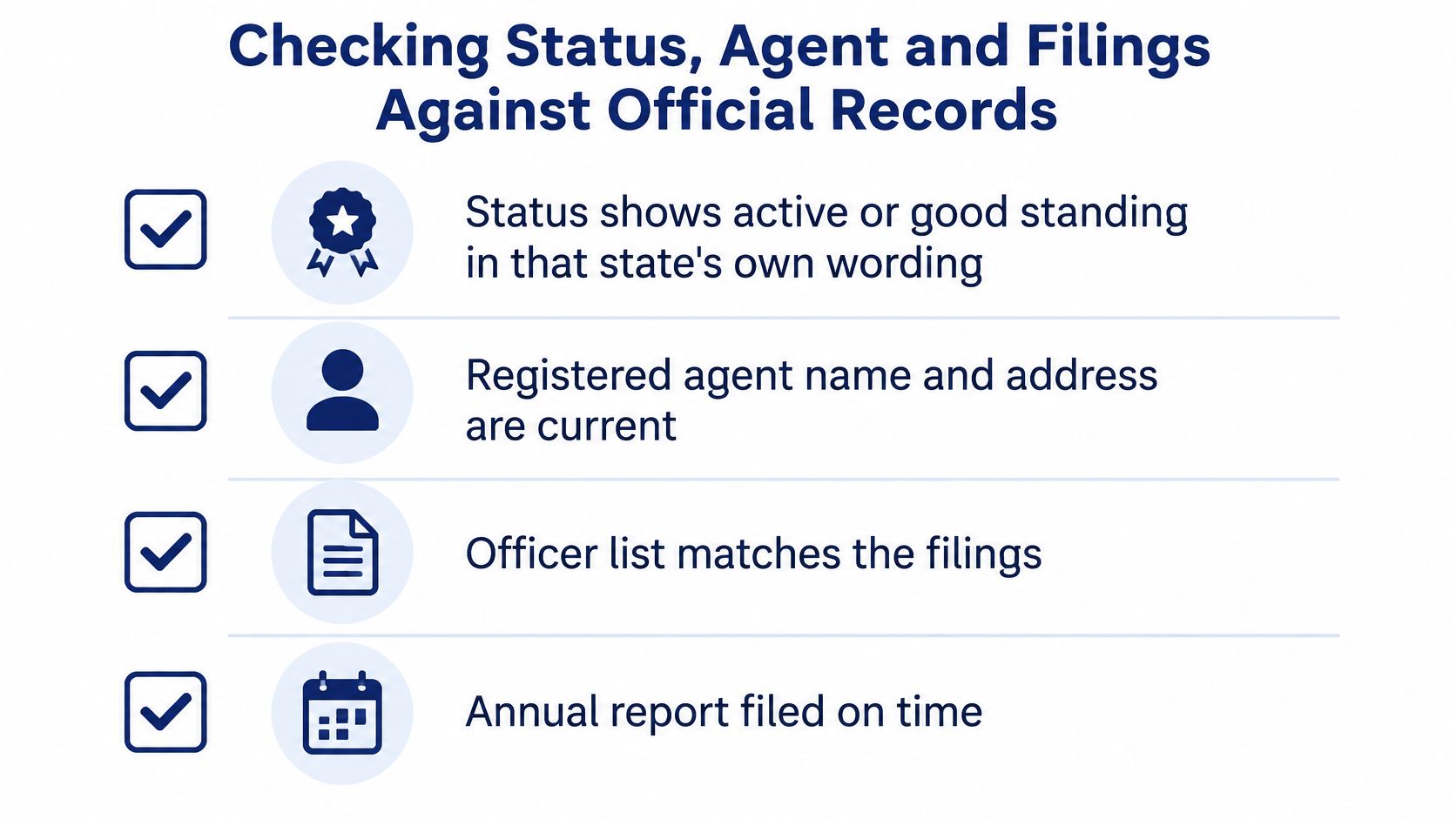
Once you have a candidate record, run it against a fixed checklist. Six items, in this order.
- Status: the record shows active or good standing, in that state's own wording.
- Registered agent: the name and address are current, not carried over from an old filing.
- Officers: the list matches the most recent filing rather than an earlier one.
- Annual report: the report for the most recent year is on file.
- Amendments: any change of agent or address is explained by an amendment you can point to.
- Principal address: the office on file agrees with the address in your own records.
Third-party company profiles can't settle any of those six items. The Zippia company profile estimates approximately 1,300 employees and estimated annual revenue of $64.0 million, while a separate employment profile places the company in a 1,001–5,000 employee and $25 million–$100 million revenue range. Both are market estimates rather than audited disclosures. They tell you the operation is large and labor-intensive, which is useful context, and they tell you nothing about legal standing.
Terms in the results cause most of the remaining confusion.
| Term | What it means in a result |
|---|---|
| Best match | The top-ranked record for your name and state, which still needs confirmation against formation date and state |
| Similar filings | Other records returned alongside the match, to review or exclude |
| Registered agent | The party designated to receive legal notices, which is why the registered agent address must be a physical in-state location |
| Registry ID | The number the state assigns, used for direct lookup |
| Filing history | The record of annual reports and amendments the state holds |
| Principal address | The office address on file with the state |
| State code | The two-letter abbreviation or full state name that scopes the query |
The most common error in a completed file is a stale agent. An entity changes its agent in an amendment, the third-party summary still lists the old one, and a notice goes to an address nobody has monitored for two years. Pull the filing history and read the most recent amendment before you rely on any agent name.
Corrections go to the state office that maintains the filing. A wrong record stays wrong in every tool that reads it until the source is fixed, and no lookup service can amend it for you.
Related Records to Check Alongside the Entity
One entity record is a snapshot. Read beside four related records, it becomes a picture of an organization that changes over time.
Similar names answer a specific question: is there a new or renamed entity in the same state that would be confused with this one? Run a variant search even when your primary match looks solid, because a recently formed company with nearly the same name is exactly what creates trouble later.
Filing history answers what changed. Annual reports and amendments show when the agent or address moved, and the order of those filings tells you which version is current.
Officer and person lookups answer who signs. If a contract is executed by someone whose name doesn't appear in the filings, that's worth a question before the paperwork is countersigned.
UCC filings answer who else has a claim. The secured-party search is in beta, and it surfaces lenders with a security interest against the business, which matters in lending and vendor files. This guide to how to find UCC filings explains how those records are indexed.
A check worth running every time: if the agent in the latest record differs from the agent named in the last amendment, pull the amendment and compare dates. The later document wins.
Similar-name results are also a caution. A filing history showing a dissolution followed by a new formation under the same name signals a successor entity, not a company that kept trading continuously.
Work in this order: identify the record, read its filing history, then check officers and secured-party filings.
Handling Dissolved, Renamed and Successor Records
A status of dissolved, withdrawn or inactive isn't the end of the story. It's the start of a second question, which is whether the business you're dealing with is the same legal person that held the older record.
- Read the status and the date it changed. A dissolution date tells you when the entity stopped being able to act.
- Pull the filing history and find the dissolution filing or the name-change amendment that explains the status.
- Compare the new formation date with August 3, 1984. A later date, especially in a different state, points to a successor rather than a continuation.
- Check whether the agent and principal address carried over. Carried-over details suggest continuity of operations, but they don't establish continuity of the legal entity.
- Record which record you relied on and why, in one sentence, next to the retrieval date.
A worked case makes the logic concrete. Say an entity with a St. Louis address was dissolved in 2010, and a later entity was formed in 2019 in Delaware under the same name. The Missouri record is not the successor, and the Delaware record gets excluded in writing with its formation date and state noted. Neither gets folded into the same file.
A name-change amendment behaves differently. It keeps the original formation date and changes only the name, so a search under the old name can still return the original record, and that's the record you want. If you need to trace that paper trail, these notes on company formation documents explain which filings carry the name change.
The question that decides everything downstream is simple. Is this the same legal person, or a new one? A vendor file, a lease or a lending decision can rely on the older record only if the answer is the same person.
Confirm the Record Before You Rely On It
For a vendor, lease, lending or compliance file, the decision path is short enough to run every time.
- Pull the record by name and state, using the legal name as filed.
- Confirm three values: the formation date of August 3, 1984 from the company history, the current status in the state's wording, and the registered agent.
- Check the filings for recent annual reports and amendments.
- If several records match, query by registry ID and document each exclusion with its formation date and state.
Save the result with the query, the retrieval date and the reviewer's name. A verification without a date is a claim without evidence.
A record that's wrong at the source stays wrong in every tool that reads it, so route corrections to the state office that holds the filing rather than to whoever supplied the report.
Teams that repeat this check often, whether in onboarding, procurement or underwriting, usually stop hand-searching fifty registry interfaces and use one endpoint instead. SOSfinder returns status, registered agent, formation date and filings across all 50 states and DC from a single lookup that takes a business name and a state, delivers the best match plus similar filings in one consistent schema, and accepts a direct registry ID search for the states that name one. We're an independent commercial service, not a state agency, so treat the registry as the authority and the API as the fastest way to read it.
If the lookup you just walked through is one you'll run again next month for a different vendor, build it into a workflow instead of repeating it by hand. SOSfinder covers entities in all 50 states and DC through one REST endpoint that returns status, registered agent, formation date and filings in a consistent schema, with direct lookup by registry ID and name-availability checks when you're forming rather than verifying. Start with a single lookup on the company in front of you and compare it to the reference profile you built here, then visit SOSfinder to see how the same call handles the rest of your portfolio.