Michigan Entity Search: How to Check Status and Filings

An invoice arrives from a Michigan LLC you've never paid before. The vendor gives you a name, sometimes a file number, and a request that finance confirm the company exists before the first payment goes out. Someone on the call asks the question that matters: is this business real, and is it in good standing right now?
A Michigan entity search answers the first half in under a minute. The second half depends entirely on what you read and what you save.
Most onboarding checks stop at the hit. A record appears, the name matches, and the search gets closed as cleared. That's the wrong stopping point. A registry hit confirms a record exists, not that the counterparty is compliant, current, or safe to pay. Treat the result as the opening move of verification and the rest of the record earns its keep.
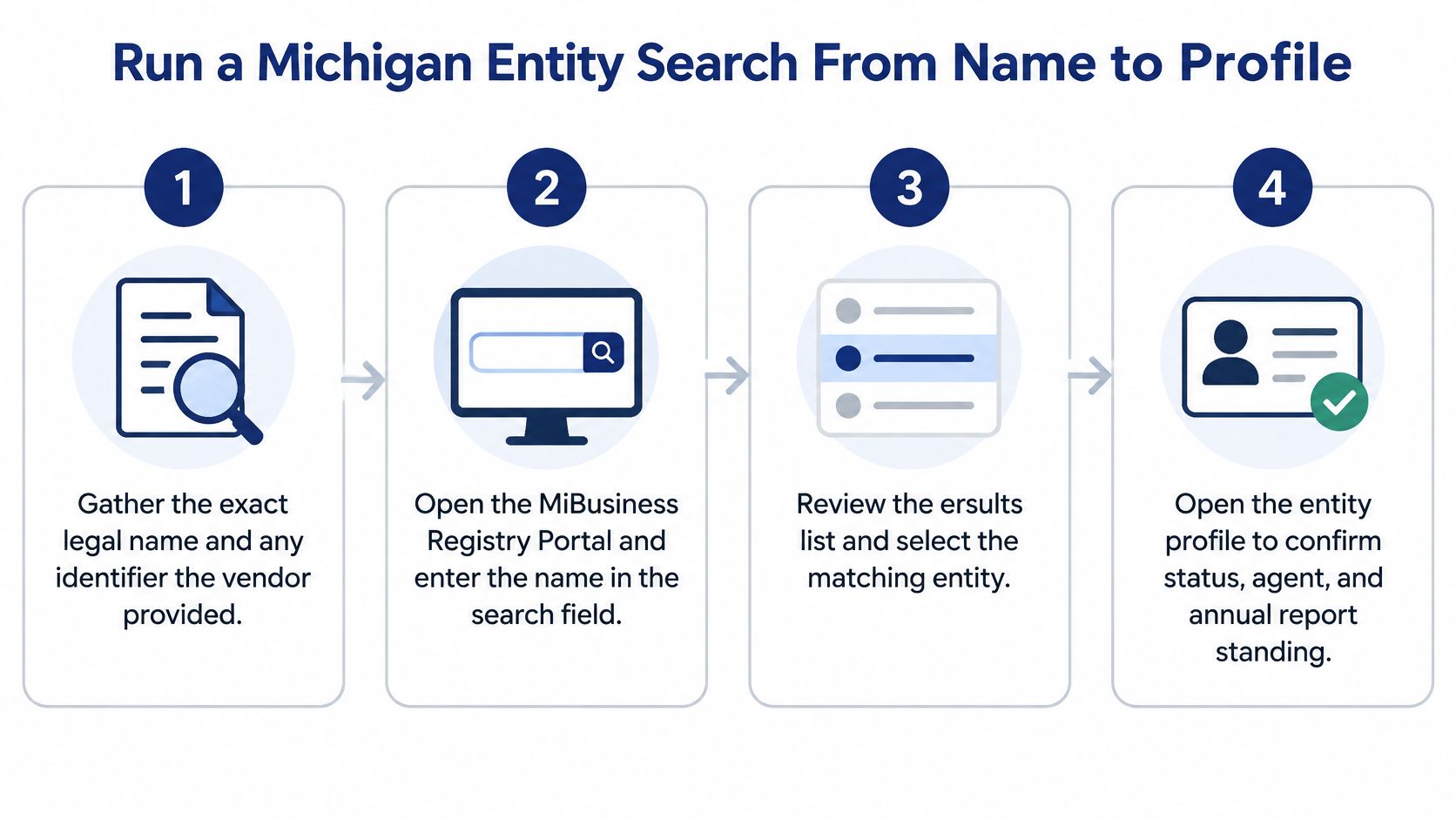
Run a Michigan Entity Search From Name to Profile
The packet is a contract name, a W-9, and, if the vendor is organized, a Michigan identification or file number. Write down four items before you touch a search field: the exact legal name, the identifier if you have one, the entity type they claim, and the address they say they operate from. Treat each item as a field to verify.
Order matters more than the tool. Each step below removes a different kind of false match. Read status before you treat any hit as cleared.
- Start with the identifier when you have one. A Michigan identification or file number returns a single record. A common name returns a page of them, and a judgment you will have to defend in an audit six months later.
- Then run an exact name search. The name with its designator and the name without it are different queries with different result sets. Exact first keeps the noise down and shows whether the filed name matches the contract.
- Widen to contains or starts-with. A vendor may file under a variation, an older name, or a designator you did not expect. The broader pass catches what the exact pass missed, and it costs one extra search.
- Check status on the shortlist before you scroll. Active, dissolved, and withdrawn are different answers to whether finance should pay. After that, registration-date range and resident-agent name cut the list further. Filtering by agent name is underused: a shared commercial agent sometimes surfaces sibling entities the vendor never disclosed.
- Read every near match. Two records with similar names and different formation dates are two different companies. Prior and assumed names explain most cases where a vendor insists the name changed but it is the same business.
- Open the profile and copy the fields that matter. Status, formation date, resident agent, registered office, annual-report history, assumed and prior names, and links to document images. Copy them into the file rather than screenshotting. You will want them diffable later.
- Save the query alongside the answer. Exact search terms, filters applied, retrieval date and time, and the identifier you matched on. A result nobody can reproduce is a result nobody can rely on.
What you leave with is one saved profile and a short list of questions for the vendor. That file is stronger than an internal note saying the company checks out.
The clearance trap: a search that shows zero confusingly similar names is a preliminary read, not a reservation.
A clean search does not hold a name. If the vendor is forming an entity or amending one, today's result says nothing about next week. For the payment file, the hit only proves a record exists. Status on that record is the first thing worth keeping.
Filter by Entity Type to Avoid Wrong Matches
A contractor invoices as Lakeside Builders LLC. You type the name, leave the entity type filter on corporation because that's what you used on the last vendor, and get nothing. The company clearly exists, so the tool must be broken. It isn't. The filter decided the answer before the search ran.
Switch to LLC and a Lakeside Builders record appears, with a formation date well off what the invoice implies and a foreign-entity marker showing it qualified in Michigan from another state. Same name, different animal. That's the failure mode worth designing against, because the name never told you anything the filter didn't.
The registry holds domestic and foreign LLCs, profit and nonprofit corporations, foreign corporations, limited partnerships and limited liability partnerships. One name can sit under several of those types at once. The mix has also tilted hard toward LLCs over time: Michigan's new business entity totals show new LLC formations rising from 36,495 in fiscal year 2002–03 to 57,892 in fiscal year 2011–12, while new profit-corporation formations fell from 20,780 to 11,008 across the same period.
| Entity type | What it covers | Confusion to avoid |
|---|---|---|
| Domestic LLC | Organized under Michigan law | Mistaking it for a foreign LLC with the same name |
| Foreign LLC | Formed in another state and registered in Michigan | Reading the formation date as the Michigan date |
| Profit corporation | For-profit business corporation | Missing it when the search is set to LLCs only |
| Foreign corporation | Formed elsewhere and qualified in Michigan | Assuming the Michigan profile shows the home-state filings |
| Nonprofit corporation | Organized for a nonprofit purpose | Expecting owners instead of officers |
| Limited partnership | General and limited partners | Missing it when the search is set to corporations only |
| Limited liability partnership | Partnership with a liability shield | Confusing it with an LLC |
Start with the type the counterparty says they are. If that returns nothing, widen to all types rather than concluding the entity doesn't exist. Then check the profile against the contract: the entity type on the record should match the entity type on the signature block before any payment is released. When it doesn't, you have a question for the vendor, not a rejection.
What Status Counts Show About Michigan Records
A vendor sends an LLC name that matches the contract. You open the Michigan record and the status is not in good standing. That result should change how you read the file, not how fast you escalate it.
A LARA budget presentation to the Michigan House fiscal agency reported 1,135,031 active business entities in FY 2025. Against a file that large, a status other than good standing is an ordinary finding. You will see it often, and the standing split is not even across types.
| Entity type | In good standing | Not in good standing |
|---|---|---|
| LLC (domestic and foreign) | A large base of current records | The larger share of LLC records |
| Profit corporation | A smaller current base | The widest gap of the three types |
| Nonprofit corporation | A substantial current base | More records out of standing than in it |
Log the status in the registry's own words on every hit. Delinquent, dissolved, expired, and revoked are different findings, and they point to different next steps. I do not treat any of them as proof the company never existed, or as a reason to release payment.
Ask the counterparty what the status is and what they have filed to correct it. An operating company can miss a filing, fall out of standing, and cure it after one email. If nobody can explain the gap, the silence is the finding. Before you end the relationship, learn how a business ends up administratively dissolved, and what that label does and does not prove about whether the company still operates.
Save the exact status text, the pull date, and the identifier. A later filing can put the same entity back in good standing, and your file has to show which version you relied on.
Confirm Status, Agent and Annual-Report Standing
A record found is not a record cleared. Onboarding teams get this wrong because the search result page reads like a verification screen, with a name, a status and an agent. It's a point-in-time registry view, and treating it as a compliance conclusion is how bad vendors get paid.
Work the checks in order, because each depends on the one before it.
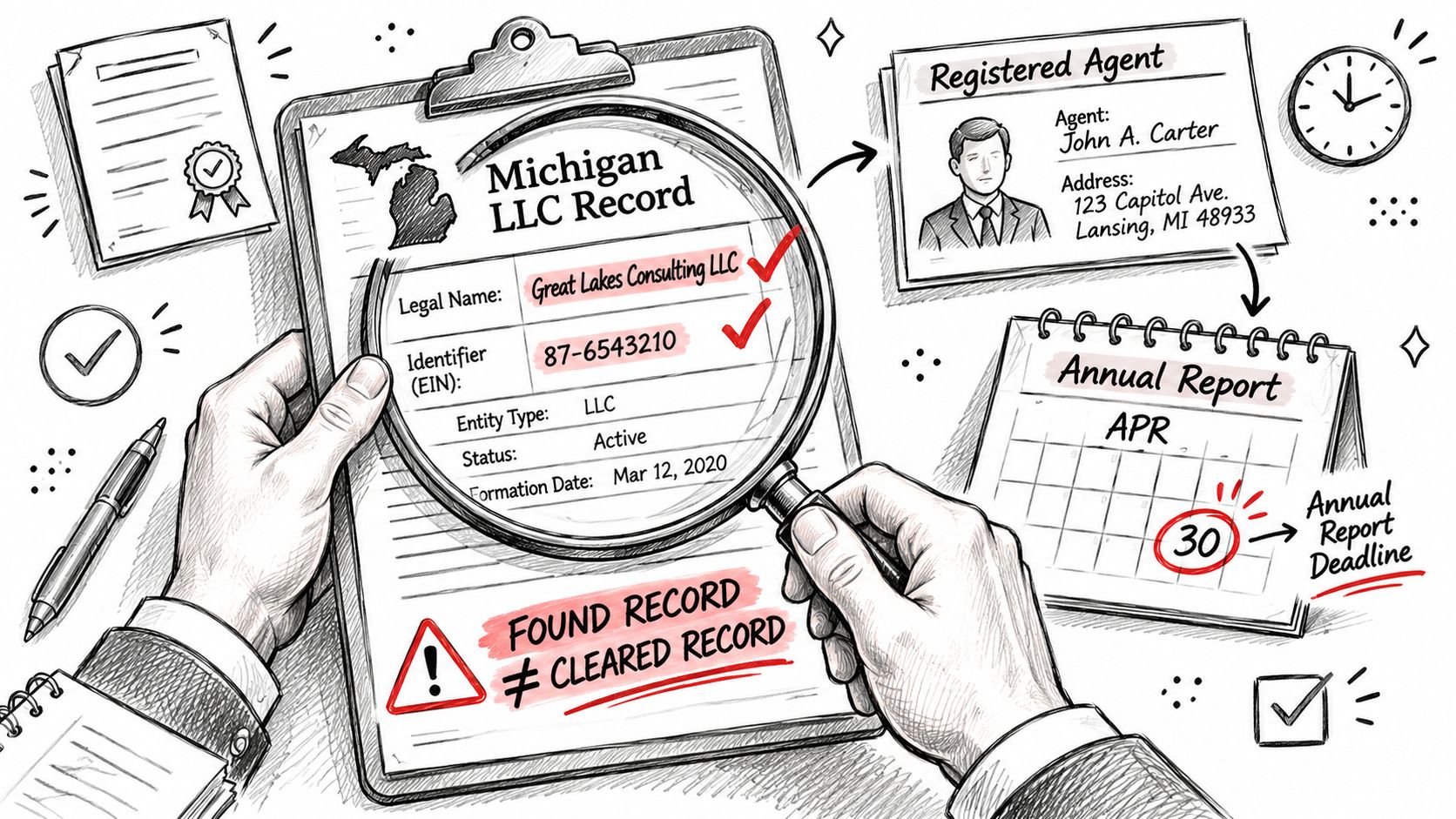
Match first, then read. Compare the legal name and identifier on the record against what the counterparty stated in writing. A name that nearly matches is not a match. If the contract says one identifier and the registry shows another, stop and ask.
Status label as the state reports it. Good standing, not in good standing, dissolved, expired. Use the state's wording rather than translating it into "active" or "inactive," because your own system will treat those words differently than the registry does.
Then the standing checks, in this sequence:
- Last annual report filed. The date tells you whether the entity has been keeping current, not just whether it once existed.
- Next filing due. A vendor whose next filing was due weeks ago and hasn't been filed is mid-drift, even if the status label hasn't caught up.
- Agent change. A recent switch to a commercial agent often signals a move, a dispute, or a sale.
- Address change. Compare the registered office to the operating address on the invoice.
- Assumed and prior names. Hidden history lives here, including names the vendor didn't mention in the onboarding packet.
Pull primary documents when underwriting, KYC or litigation risk justifies the extra step. The corporate filing FAQ from LARA notes that a foreign entity's qualification filing must include a certificate of good standing from its formation jurisdiction dated no earlier than 30 days before filing, so when a vendor hands you a certificate, check the date on it before you accept it as current.
Four mistakes drive most bad decisions. A registered agent is not an owner or officer. An active-looking record is not proof of good standing. Assumed and prior names hide the history. A preliminary name search does not reserve anything. Understanding what a registered agent address actually represents clears up the first one permanently.
Record the verification result against the exact query and date it was run. Store retrieval timestamps, source identifiers, document URLs or hashes, and the query parameters. When a portal call fails, retry it, but never let a missing field become a negative finding.
Find Filings and Documents in the Online Portal
Michigan changed the plumbing on June 23, 2025, when the state launched the MiBusiness Registry Portal and replaced the prior workflow for searches, filings, certificates and copies. Paper annual reports and statements were discontinued, so those filings now go through the online path.
That split matters more than it sounds. There are two distinct paths, and they don't have the same access requirements.
The public search path returns the entity profile, the annual-report history and document images. This is what you use for vendor verification, name checks and due diligence, and it's the path you should document in your onboarding playbook.
The authenticated filing path is for filing, and it may require a MiLogin for Business account. A search that works perfectly does not tell you anything about whether a filing action is available to you, or to the vendor.
The practical order for a documents check:
- Search the record and confirm you have the right entity, not a near match.
- Read the annual-report history and the document images for the most recent filings.
- Request certificates or copies when a counterparty or your own credit team needs official proof rather than a screenshot.
- File only through an authenticated path you control. Never let a third party file on your behalf based on a search result.
If you're checking whether a filing is overdue, read the most recent annual-report images to see what was filed and which fee band applies. Don't infer delinquency from a status label alone.
Two boundaries are worth stating plainly. We're an independent commercial service, and we're not affiliated with, endorsed by, or acting on behalf of any Secretary of State, state agency or other government body. We also can't file documents, register entities or change any official record on a customer's behalf. Any product that claims otherwise is describing something the state doesn't allow.
When you pull a document, save four things with it: the document name, the filing date, the filing type, and any confirmation number. Those four fields are what let you reconstruct the check months later, and they're what makes the difference between company formation documents that support a decision and a folder of undated screenshots.
Fix Failed Searches and Missing Records
A vendor you paid last quarter can vanish from a Michigan search because the legal name on the invoice does not match the registry, or because the company changed its name after that template was saved.
Search by identifier before you conclude the company is not registered. Then open the nearest record and read prior names and assumed names. A business trading under a name it registered two years ago will not match a search on the name in its email signature.
| Symptom | Likely cause | Fix |
|---|---|---|
| No match for a known company | Name written differently or changed later | Search by identifier, then check prior and assumed names |
| Too many similar results | Common name | Add entity type and registration-date filters |
| Record looks active but should be delinquent | Status not yet reflected or annual report not checked | Read status first, then annual-report history and document images |
| Portal timeout or blank page | Temporary portal failure | Retry later and log the attempt timestamp |
| Filing action not available in search | Filing needs an authenticated account | Use the authenticated path, such as MiLogin for Business |
| Blank agent or officer field | Field not published or not provided | Record as unknown and request the document |
Work the rows in that order. Change the search type first. Apply filters second. Read the record third, status before agent or filings. Retry the portal last. Starting with a refresh burns time on the site when the problem is spelling or a prior name.
A returned profile is the start of the check, not the end. Status is the first field that changes what you do next. Active, delinquent, dissolved, and expired are different problems, and a label that looks current does not close the file if the annual-report history is behind.
A blank agent or officer field usually means the state didn't publish it, not that the entity has none. Record it as unknown and request the document. Writing "no agent on file" into a risk memo because a table cell was empty is the kind of error that survives three levels of review.
Record the timestamp before you retry. A failed retrieval you can date is evidence. A failed retrieval you remember is a story.
If annual reports are overdue, file them in chronological order. You can't skip ahead to the current year and leave the older gaps open. The document images show which years are missing, and that sequence is what a later reviewer will expect in the file.
Stop searching when the name matches a dissolved or expired record and the counterparty still says the business is active. More queries won't settle that. The answer is in the primary documents and in the filings the counterparty supplies. A failed match that turns out to be a name variation is a different outcome from a company that isn't registered.
Confirm the Record Before You Rely on It
Three outcomes, applied in order.
Accept when the legal name, identifier, entity type and status all match what the counterparty stated, and the annual-report history is current. Save the profile, the query and the date, and move on.
Request primary documents when the status is unclear or the annual-report history has gaps you can't explain. Formation documents, the most recent annual report, and any certificate of good standing do the work.
Hold the relationship when the record is dissolved or expired, or when the registered agent or address conflicts with what the counterparty provided. Those conflicts are the ones that don't resolve with a follow-up email.
For teams running these checks at volume, the manual loop doesn't scale past a few dozen vendors a month. Our entity search finds business entities by name and state and returns the best match plus similar filings, each with status, registered agent, officers and addresses, which covers most of the profile checks above in one call. It can also look a single record up directly by a state's registry ID field, the way entityId works for NY and CA, documentNumber for FL and fileNumber for DE. Before you build Michigan into a workflow, confirm that the state's identifier is supported and test it against records you already know.
A search result is the start of verification. Save every record with its query, date and source before it supports a decision.
When the next Michigan vendor lands in your queue, run the name, read the status, and pull the filing history before you release a payment. SOSfinder returns the profile pieces you need in one response, including status, registered agent, addresses and filing history with state PDFs where they exist, so your onboarding team spends its time on the exceptions instead of retyping registry pages. Start with a name and the state code MI, compare the result to the contract in front of you, and keep the retrieval timestamp in your file.